
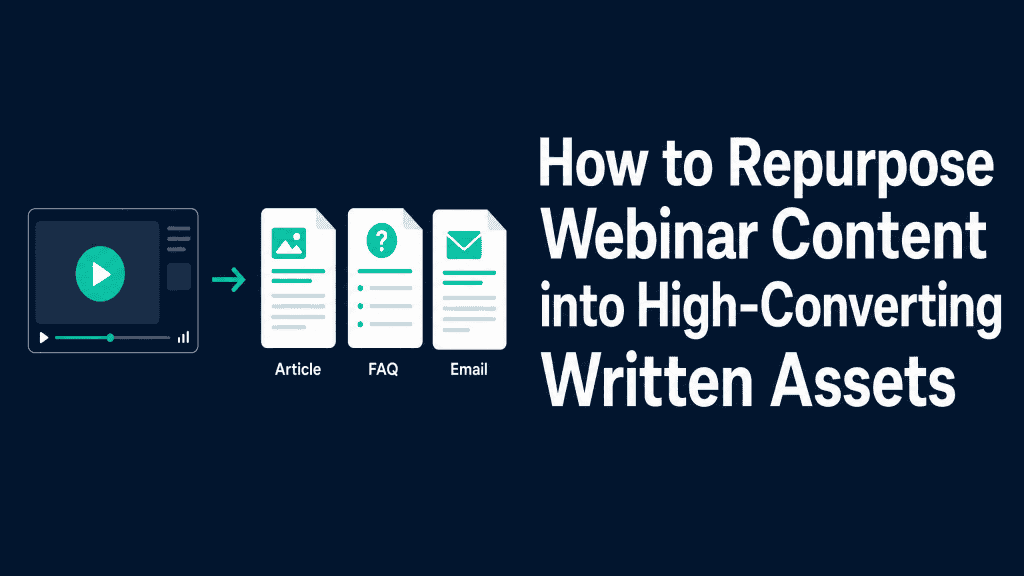
How to Repurpose Webinar Content into High-Converting Written Assets
Semantic Summary
Idea: A webinar can become several useful written assets when every asset answers a specific buyer question instead of repeating the recording in another format.
Challenge: Many teams publish a raw transcript, a generic recap, and a few social posts without checking claims, selecting the strongest ideas, or giving the reader a useful next step.
Summary: Start with a clean source pack, choose questions with real commercial or educational value, and turn each answer into the written format that fits the reader’s next decision.
Related Reads
- Podcast-to-Blog Atomization: The 5-Step Framework to Turn One Interview into Five Articles
- Content Atomization: The Ultimate Guide to Maximizing Your Content ROI
- Creating BoFu Content That Actually Converts
Repurpose webinar content by treating the session as evidence and expertise not as a finished campaign. The recording, transcript, slides, questions, poll results, and presenter examples can each support a different written asset. The key is to make a clear editorial choice about which question an asset should answer and what the reader should do next.
A useful webinar content repurposing process does not aim to create the maximum number of assets. It aims to create the few assets that make the original expertise easier to find, understand, share, and use.
For a B2B content marketing team, one practical way to repurpose content is to create a search-led article, a decision-stage FAQ, an email for registrants, and a short brief that helps a sales conversation.
The Webinar-to-Written-Assets Map
Choose the written asset from the reader’s job, not from a publishing quota. A single webinar may contain several good ideas, but each content piece should have one primary audience need and one clear next action.
| Buyer question | Best written asset | Use from the webinar | Helpful next action |
| “How do I solve this recurring problem?” | Search-led article or how-to guide | One well-explained framework, demonstration, or expert explanation | Read a related guide or assess the current process |
| “Does this approach fit my situation?” | FAQ page or comparison-oriented resource | Repeated live questions, objections, and boundary conditions | Review criteria, use a checklist, or book a relevant conversation |
| “What should I do after watching?” | Follow-up email sequence | Three practical takeaways and one specific resource | Watch on demand, read the article, or share with a teammate |
| “Can I explain this internally?” | Sales enablement brief or executive summary | Decision context, evidence, terms, and a concise recommended path | Use the brief in an internal review or evaluation meeting |
Content repurposing is the process of adapting existing content for a new use. To repurpose webinars well, choose from a few proven repurposing strategies: turn your webinar into a search article, convert a useful section of webinar audio into a written explanation, or create shareable content for social media.
Do not treat every idea as equal. Valuable content earns its place because it solves a distinct reader problem and fits the content distribution strategy.
Why Webinar Repurposing Often Produces Weak Content
Weak repurposed content usually fails because it copies the event format rather than redesigning the idea for a new reader. A live event includes introductions, pauses, housekeeping, repeated questions, and moments that work only when a viewer is present. Written content needs a different structure.
A Webinar Recording Is Source Material, Not a Finished Asset
A webinar recording is valuable because it captures specialist knowledge, language used by real prospects, and examples that may not appear in a standard content brief. It is not automatically a blog post.
A recording may contain a good answer at minute 37, but a reader should not need to watch 37 minutes to find it. Whether your webinar is live or on demand, the first rule is the same: do not let old content determine the structure of a new asset.
Begin by marking the useful moments: an original explanation, a surprising objection, a demonstrated workflow, a useful question from the audience, or a claim supported by a source.
Those moments are the raw material for new content formats. The rest can remain in the on-demand webinar without being carried into every asset.
Repurposing Is Not Reposting
Reposting means sharing the same webinar recording again. Repurposing means adapting the underlying idea for another use. A written article may turn one 10-minute explanation into a structured answer with headings, examples, internal links, and a clear next step.
An FAQ may turn five questions from the chat into concise answers. An email may turn the strongest practical takeaway into one reason to revisit the topic.
That distinction matters because the reader has not necessarily attended the live webinar. They arrive with a different level of knowledge, a different amount of time, and a different question. Good content repurposing respects those conditions.
Start With the Buyer Question, Not the Format
Before deciding to write blog posts, emails, or a sales brief, ask what the webinar helps a person decide.
A session about content operations may answer several questions: how to prioritize work, who should review a claim, what a useful brief includes, or how to report progress. Do not force all four into one new article.
Choose the one question with the clearest evidence and the strongest fit with an existing content gap. Then decide whether it belongs in discovery content, evaluation content, customer education, or sales enablement. This is the same intent-first logic behind a well-built B2B buyer journey.
There are many ways to repurpose webinar content, but the best choice is rarely the longest list of formats.
Select a content type because it helps a buyer do something: compare options, explain a problem internally, prepare for a conversation, or complete a task. A single piece of content with a clear job will usually outperform several generic assets.
Build a Source Pack Before You Create Written Content
A reliable source pack protects accuracy and makes editing faster. Gather the original assets before anyone drafts new content.
This avoids the common problem of writing from a rough transcript and later discovering that a speaker was quoting an outdated number or referring to a slide the transcript does not explain.
Clean the Webinar Transcript and Identify Speakers
Start with a transcript, but do not publish it unchanged. Automated transcripts often confuse product terms, company names, acronyms, and speaker changes.
An editor should correct important terminology, separate speakers, remove repeated filler, and flag statements that need verification.
Use the transcript as a searchable editorial record. The W3C recommends making transcripts more useful with logical paragraphs, headings, links, speaker identification, and timestamps only when they genuinely help navigation.
Those same practices make it easier for an editor to extract a coherent written answer from a long webinar.
Collect Slides, Q&A, Polls, Chat Questions, and Resources
The best written asset may not come from the prepared talk. It may come from a question that appeared repeatedly in the chat, a poll result that exposed uncertainty, or an example a presenter gave in response to a challenge. Save these materials alongside the webinar recording and transcript.
Create a simple source pack with five folders or labels: recording, transcript, slides, audience questions, and cited resources. Add an owner and date. This makes it clear what an editor can reuse, what requires permission, and what needs a fact check before it becomes new content.
Confirm Time-Sensitive Claims Before Reuse
A live webinar can contain a claim that was accurate on the event date but is not reliable months later. Review dates, product capabilities, regulations, performance figures, customer examples, and quoted research. If a claim cannot be confirmed, remove it, qualify it, or replace it with a durable principle.
This is especially important when an AI-assisted workflow is used for transcription or first-draft support. AI can speed up extraction, identify repeated questions, and group topics covered in your webinar.
However, AI cannot decide whether an old claim is still true or whether a speaker’s off-the-cuff example should become a public statement. Use AI to reduce manual sorting, then assign a human editor to confirm meaning, evidence, and brand context before publishing.
Use AI for Extraction, Not for Unchecked Publication
AI can help transform webinar content into a first outline, a candidate FAQ, or a list of possible blog posts. It can also help content creators locate the parts of your webinar that address a recurring question.
The output is a working draft, not evidence. Keep the source recording, transcript, and cited resources available during review so the final written content remains accurate.
Choose Written Assets by Buying Moment
Different webinar insights serve different stages of a decision. Repurpose your webinar into a small asset set that meets readers where they are rather than sending every audience to the same on-demand page.
Create a Search-Led Article From One Strong Question
Turn a webinar into an article when the session answers a question people are likely to search for repeatedly. Use one clear H1, a direct opening answer, logical sections, and examples that clarify the process. Link to the full recording as optional depth, not as a substitute for the written explanation.
For example, a webinar about turning expert conversations into content could become an article that explains one repeatable extraction method. Contadu’s guide to podcast-to-blog atomization shows why a structured method is more useful than simply converting spoken words into paragraphs. In other cases, a full webinar recording may support a short article series rather than one oversized post; choose different content types only when each has a distinct question to answer.
Turn Recurring Q&A Into an FAQ or Help Resource
Audience questions often reveal the gap between a presenter’s assumptions and a buyer’s real concern. Group similar questions, identify the answer that the webinar actually supports, and write short responses in plain language.
If the question deserves a deep explanation, create a standalone page and link to it from a shorter FAQ.
Do not preserve the live wording simply because it appeared in the chat. Remove personal details, clarify vague questions, and ensure the answer does not overpromise. The goal is a useful resource, not a transcript of the event.
Build an Email Follow-Up That Helps Registrants Act
A useful follow-up email gives a recipient one reason to return to the subject. It should not try to summarize the entire webinar. Choose one takeaway, explain why it matters, and link to the most appropriate asset: the recording, a written guide, a checklist, or a related resource.
Segment where the data and consent model allow it. Attendees may need a next-step resource; no-shows may need a concise reason to watch on demand; existing customers may need an adoption-oriented version of the same idea. The asset is the same source of expertise, but the message changes with the reader’s context.
Create a Sales Enablement Brief for Evaluation Conversations
A webinar can also become a short internal brief when it explains a buying problem, a method, and the evidence behind a recommendation. Keep the brief focused: the audience problem, the key insight, the proof available, common questions, and links to deeper content.
This helps sales and customer-facing teams use the same approved language without asking them to watch the whole webinar.
For decision-stage content, pair the brief with an article such as Creating BoFu Content That Actually Converts. The goal is not to turn every asset into a demo request. It is to give a reader the right next action for their stage.
A Seven-Day Webinar-to-Written-Assets Workflow
A short production window keeps the webinar relevant while giving the team time to edit carefully. The workflow below is a practical default, not a rule. Adjust it for speaker availability, review requirements, and the complexity of the subject.
Day 1: Inventory the Recording and Transcript
Save the webinar recording, slides, chat export, poll results, transcript, and presenter resources. Mark speaker changes and select three to five promising moments. Record any permissions or claims that require review.
Days 2–3: Extract Themes, Questions, and Proof
List the questions covered in the webinar. Score each one for audience relevance, evidence quality, fit with the content strategy, and likely next action. Select one primary article topic, one FAQ cluster, and one email angle. This prevents one webinar from becoming several thin content pieces.
Days 4–5: Draft the Priority Assets
Write the article first because it usually provides the most durable written content. Then derive the FAQ, email, and sales brief from the approved article not from separate, conflicting drafts. This reduces review work and helps the same message travel across content distribution channels.
Days 6–7: Review, Publish, and Distribute
Ask a subject-matter expert to confirm claims, an editor to check structure and clarity, and the campaign owner to confirm the intended next action.
Publish the article, add internal links, distribute the appropriate assets, and record what questions or objections appear next. Use that feedback to improve the next webinar and the next content creation workflow.
Finally, add approved assets to the content calendar. This turns a recorded webinar into a steady stream of content across the channels that matter, without asking the team to create content from zero every week.
When the original webinar contains useful video content, a short clip can support the written asset; when the reader needs detail, the article should remain the primary destination.
Quality Controls That Keep Repurposed Content Useful
The biggest quality risk is not reuse; it is reuse without editorial judgment. A few clear controls help the team preserve the speaker’s expertise while making it useful for a reader who did not attend the session.
Keep the Speaker’s Meaning, but Remove Live-Event Noise
Remove repeated welcomes, technical problems, audience greetings, and improvised transitions. Preserve the substance of an answer, but rewrite spoken language into concise written language. If an example needs context that was visible on a slide, add that context or leave the example out.
Separate Evidence From Opinion and Promotion
Label opinion as opinion. Link to the original source for research claims. Avoid turning a confident statement from a presenter into a universal rule. When the webinar contains product commentary, keep the written asset useful even for a reader who is still evaluating the problem.
Make Transcripts Easier to Use
A full transcript can be valuable for accessibility and for readers who want more detail. It should be organized, not dumped below the recording. Add headings, identify speakers, link to referenced resources, and include timestamps when they help someone find a specific section.
The W3C notes that a transcript is typically best on the same page as media hosted on your own site, while a separate transcript page can work when the media lives elsewhere.
Measure Value Beyond Asset Count
Success is not “we made ten pieces of content.” Measure whether the repurposed content helped the right audience discover an idea, understand it, and take a useful next step.
For an article, watch qualified organic visits, engaged reads, relevant internal-link clicks, and assisted conversions. For an email, look for replies, resource visits, registrations, or progression to the next helpful asset. For sales enablement, ask customer-facing teams whether the brief surfaced better questions or reduced repeated explanations.
Use the learning loop to improve the next webinar. Questions that recur in email replies may deserve a new FAQ. A section with sustained reading may justify a deeper article. An asset with little use may have been aimed at the wrong buyer question. That is how content repurposing becomes a content system rather than a one-off campaign.
How Contadu Helps Turn Webinar Insight Into a Content System
Contadu helps teams decide which webinar ideas deserve a durable written asset and how that asset fits the wider content system. Instead of drafting from a transcript alone, content teams can use search intent, topic gaps, entity coverage, and existing-page performance to select the webinar question with the clearest opportunity.
Contadu can also support a consistent workflow across briefs, outlines, internal links, content scoring, and refresh decisions. That means the article, FAQ, follow-up email, and sales brief can be connected to a shared source of insight rather than developed as isolated pieces. The result is less duplicated work and a stronger path from expertise to distribution.
Frequently Asked Questions
What does it mean to repurpose webinar content?
Repurposing webinar content means adapting the useful ideas from a webinar into new formats for a different reader need or channel. It is more than sharing the recording again: an article, FAQ, email, or sales brief should make one part of the webinar easier to find and use.
How do you turn a webinar into a blog post?
Choose one strong question answered in the webinar, clean the relevant transcript section, verify claims, and structure the answer for a reader who never watched the session. Add context from slides or resources, use clear headings, and link to the recording for optional depth.
Which written assets should you create from one webinar?
Start with the assets that fit real audience needs: one search-led article, one FAQ cluster, one follow-up email, and one internal sales brief are often enough. Add more only when the webinar contains distinct questions with enough evidence to stand alone.
Should you publish a full webinar transcript?
You can publish a transcript when it improves access to the content and helps readers find detail. Edit it first: identify speakers, add useful headings and links, correct important terms, and include timestamps only when they aid navigation.
How soon should you repurpose a webinar after it ends?
Start the source-pack and extraction process within one or two working days, while the questions and campaign context are still fresh. Publish only after the relevant claims have been reviewed and the asset has a clear next action. This makes it easier to repurpose your content before the event context fades and helps accelerate content production without lowering editorial standards.
How do you make sure a repurposed webinar claim is accurate?
Check the recording, slides, cited source, and date of the claim. Ask the speaker or subject-matter reviewer to confirm anything time-sensitive, commercially sensitive, or likely to be interpreted as a promise.
How do you measure webinar content repurposing?
Measure the result by asset and buyer stage. Track discovery and qualified engagement for articles, useful actions and replies for email, and sales or customer feedback for enablement materials. Combine those signals with the original webinar’s goal rather than relying on an asset-count target.