
Website Migrations for AI Search Visibility: Redirects, Entities, and Recovery
Semantic Summary
The Idea: A website migration is a move of URLs, content, and technical signals. It can include a new domain, new paths, a new content management system, a redesign, or a new site structure. A safe move protects the meaning and value of important pages, not only their addresses.
The Challenge: Teams often treat a migration as a launch-day project. In reality, a missing redirect, an old noindex tag, an unclear replacement page, or broken internal links can make a search engine and an AI system see a less useful version of the site.
The Solution: Build a URL map, preserve the purpose of priority pages, use direct permanent redirects, test the new site before launch, and monitor recovery after launch. Add an entity and content review so the new site keeps the named concepts, evidence, and answers that made key pages valuable.
Related Reads
- How to Optimize Your Site Architecture for AI Crawlers
- Log File Analysis for AI Bot Crawl Budget
- The Impact of Core Web Vitals on LLM Rankings
Bottom line: website migration SEO is about helping people and search systems follow the same page from its old location to its best new location. If you preserve direct redirects, page purpose, internal context, and clear technical signals, you lower the risk of losing hard-won visibility during a site move.
For AI search, the same discipline matters. No redirect plan can promise that an AI answer system will cite a page. But a new site is easier to retrieve and understand when its URLs work, its main content is clear, its internal links point to the right places, and its important concepts did not disappear during the move.
What Is a Website Migration and Why Does It Affect SEO?
A website migration is a significant change to how a website is reached or organised. It may involve a domain change, a move from HTTP to HTTPS, a new URL pattern, a new content management system, a website redesign, or a changed site structure. Google treats a URL-changing move as a process that needs preparation, URL mapping, redirects, and monitoring.
SEO means search engine optimization: the work that helps a search engine find, understand, and show useful pages. During a site migration, search engines need time to crawl the old URLs, follow redirects, crawl the new site, and reassess the new pages. That can cause temporary movement in rankings and traffic. The point of a migration plan is not to promise zero change. It is to avoid preventable loss.
The Types of Changes That Count as a Migration.
A move to a new domain is the clearest migration type, but it is not the only one. Moving paths from /old-page to /new-page, replacing a content platform, changing a category structure, merging two sites, or redesigning product pages can all change how a search engine understands the site.
Infrastructure work with no user-visible URL change is different. A hosting move or content delivery network change still needs careful technical SEO testing, but it does not use the same redirect and Change of Address steps as a domain move. Keep the migration type clear before anyone builds a checklist.
Why Rankings and Traffic Can Fluctuate.
After a migration, search engines have to discover, crawl, and index the new URLs. Google says that temporary ranking changes can happen while this work takes place, and that the timing depends on factors such as the number of URLs and server speed. Do not set a fixed recovery date as a promise to leadership.
Instead, define what recovery means for your migration project. It might mean that every priority URL has a working redirect, that the new sitemap is being processed, that the top pages are indexed, and that clicks and impressions are gradually moving from the old site to the new site. That creates a practical recovery view rather than a panic response to day-one fluctuation.
The AI Search Continuity Layer.
Standard SEO migration work protects URLs and rankings. AI search continuity adds another useful question: did the new site keep the facts and concepts that make a priority page understandable? An entity is simply a clearly named thing, such as a product, service, person, category, method, or customer problem.
For example, a product comparison page may be moved to a new URL with a good redirect. It can still lose value if the new version removes the product name, decision criteria, supporting proof, and links to related pages. Preserve the page’s useful meaning alongside its URL. This aligns with an AI-ready site architecture that keeps important relationships visible.
The Migration Principle: Preserve Meaning Before You Preserve Design
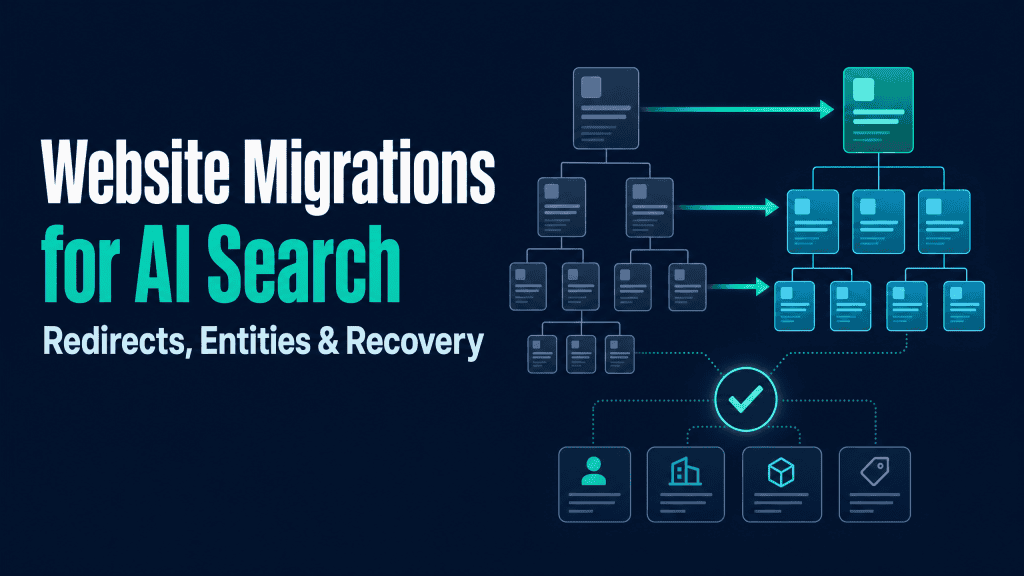
The first priority in a website migration is not a prettier layout. It is a clear connection between an important old page and the best new page for the same user need. A direct redirect helps that connection technically; matching content purpose helps it make sense.
Create an Inventory of Valuable Pages.
Start with an inventory of the current site. Include URLs from your XML sitemap, web analytics, server logs, internal-link reports, pages with external links, and pages that support leads or customers. Google recommends using sitemaps, traffic data, logs, and pages with internal or external links to identify important URLs for a more complex site move.
Do not stop at HTML pages. Include PDFs, images, video pages, downloads, and other public assets when they have traffic, links, or a clear role in the customer journey. List the old URL, planned new URL, page type, traffic signal, owner, and decision: keep, merge, replace, retire, or redirect.
Map Every Important Old URL to a New Intent.
A redirect map is not only a spreadsheet of addresses. For each old URL, document why the page existed and which new page now meets that same need. The best target is usually the closest relevant page, not the homepage and not a generic category page.
Google warns against redirecting many old URLs to one irrelevant destination because that can confuse users and may be treated as a soft 404. If several older pages have genuinely been consolidated into one stronger resource, that resource can be the right target. Record the reason so the decision is easy to review later.
Protect Core Entities, Evidence, and Page-Level Answers.
For every high-value page, record the core entities and claims that should survive the move. This might include a product name, a category term, a named feature, an author, a verified data point, a customer use case, or a clear answer to a common question.
Then compare the old and new page. Does the new page still explain the same task? Does it still provide the evidence that supports a claim? Do its internal links still connect to the important related pages? This is content and SEO working together. It also makes the new site easier to audit after launch.
Website Migration SEO Checklist: Before Launch
Most migration problems are cheaper to fix before launch. The pre-launch checklist should show who owns each task, what counts as evidence, and how the team will roll back a serious error. A good website migration checklist turns a high-risk launch into a series of testable decisions.
| Phase | What to check | Evidence to save | Why it matters |
| Before launch | URL inventory, redirect map, page purpose, priority entities, content ownership | Approved old-to-new URL map and priority-page list | Prevents important pages from being lost or sent to the wrong destination |
| Before launch | Staging access, robots rules, noindex rules, canonical URLs, analytics, XML sitemap | Technical QA record for representative templates | Prevents the new site from launching blocked, mislabelled, or unmeasured |
| Launch day | Permanent redirects, priority URLs, internal links, status codes, error pages | Redirect test report and launch checklist sign-off | Gives users and crawlers a direct path from the old site to the new site |
| After launch | Indexing, clicks, impressions, crawl errors, server logs, content continuity | Weekly recovery report and issue log | Separates normal transition noise from fixable SEO issues |
Set Scope, Ownership, and a Rollback Plan.
Write down the migration scope in plain language. Are you moving a website from one domain to another? Are you changing the content management system? Are you redesigning templates? Are you also changing copy, navigation, and site structure? The more major changes you make at once, the harder it is to find the cause of a traffic drop.
Google recommends changing one major thing at a time where possible. Assign one owner for the redirect map, one for technical SEO checks, one for content review, and one for launch approval. Agree on the rollback rule before the live site changes: for example, what error rate, broken-page count, or conversion failure means the team must pause.
Benchmark the Current Site.
Before you migrate a website, capture a baseline. Export priority URLs, top search queries, clicks, impressions, indexed-page patterns, traffic, conversions, and pages with strong internal or external links. Use Google Search Console for search visibility, Google Analytics for user behaviour, and server logs for crawler and response-code evidence.
Run an SEO audit of the current site and keep the result. The audit becomes your comparison point. It helps you see whether a post-launch issue is new, inherited, or unrelated to the migration. It also tells you which pages have the most SEO value and deserve the strongest QA.
Build the Redirect Map.
For URL changes, build an old-to-new mapping before the new site goes live. Include the source URL, final destination, redirect type, page decision, expected status code, and owner. A redirect should take a user to the final relevant page in one step whenever possible.
Use permanent server-side redirects, such as HTTP 301 or 308, when a page has moved permanently. Google recommends permanent server-side redirects where possible and treats JavaScript redirects as a last resort because rendering can fail. Check for redirect chains, loops, and destinations that return an error.
Prepare the New Site for Crawling and Indexing.
Before launch, test the new site as if it were already live. Confirm that the production robots.txt file allows the right crawling, that temporary noindex rules will be removed, and that canonical URLs point to the new pages. Google specifically advises preparing these changes before the move begins.
Create a new XML sitemap with the final new URLs. Check that each important new page returns the correct HTTP status code, loads its main content, uses a clear title and heading, and has the internal links needed to fit into the new site structure. For pages built with client-side scripts, use the same rendering checks described in the Core Web Vitals and LLM visibility guide.
Test Content, Internal Links, and Technical Signals.
Use a representative set of pages: homepage, category, product, feature, pricing, article, comparison, help page, PDF, and error page. On each page, test the URL, redirect target, status code, canonical URL, title, main content, internal links, structured data, and analytics tag.
Review internal links closely. A new site can have perfect redirects but still make people and crawlers travel through old URLs if navigation, related-read modules, and in-body links were not updated. Link directly to the new URL wherever you control the link. The same principle supports entity-based internal linking.
Launch-Day Website Migration Checklist
On launch day, keep the work simple and visible. Turn on redirects, test priority pages, confirm technical signals, and record what changed. Avoid using the launch window to make unplanned copy or design decisions.
Turn On Direct Server-Side Redirects.
Test a sample of redirects before you open the new site to all users. Then test the most valuable URLs immediately after launch. Check that a redirect goes straight from the old site to the final new URL, returns the expected permanent status, and does not point to a page that is blocked or unavailable.
Keep redirects for as long as possible. Google recommends retaining them for at least one year in a URL-changing move, while the Change of Address documentation advises at least 180 days for a domain move. The practical choice depends on traffic, links to your site, and the cost of keeping the old infrastructure available.
Update Canonical URLs, Internal Links, and Sitemaps.
Once the new site is live, make sure each new URL uses a self-referencing canonical URL. Update internal links so your own site no longer sends people through redirects. Submit the new sitemap in Google Search Console and retain the old sitemap long enough to monitor the change from old URLs to new URLs.
Also update public profile links, paid campaign links, email templates, and high-value external links where possible. A redirect preserves a path, but a direct link gives a cleaner user experience and reduces server work.
Use Change of Address Only When It Applies.
The Change of Address tool is for moving from one domain or subdomain to another. It is not for moving pages within the same domain, switching HTTP to HTTPS, moving between www and non-www on the same domain, or changing hosting with no visible URL change.
For a qualifying domain migration, verify both old and new properties in Google Search Console, complete the pre-work, set redirects, then submit the change. Do not use the tool as a replacement for redirects; Google’s own guidance says to use it after you have moved and redirected the site.
Test Priority URLs and Error Pages.
Test your highest-value pages first. These should include core commercial pages, top articles, pages with strong backlinks, and pages that support current campaigns. Then test intentionally invalid URLs, deleted pages, and merged pages. A genuine retired page should return a meaningful 404 or 410 response unless there is a relevant replacement.
Use the URL Inspection Tool for individual Google-facing tests and a generic site crawler for larger checks. Keep the results with the migration project. When you later investigate an indexing or ranking issue, you will know whether it was present at launch.
The First 30 Days: Measure Recovery Without Panicking.
Recovery begins after launch, not when the last redirect is added. Watch the transition from the old site to the new site, investigate clear errors quickly, and give normal recrawling time to happen. A recovery dashboard should show evidence, not a single traffic number.
Monitor Old and New URL Signals.
In Google Search Console, watch the new sitemap, indexing patterns, crawl errors, and search queries. Google says that in a normal URL move, indexed URLs from the old sitemap should fall while indexing of the new sitemap rises. Compare this trend with clicks, impressions, and conversions in your web analytics.
Also monitor server logs. Logs show whether a web crawler reaches the old site, follows redirects, visits the new site, or encounters an unexpected HTTP error. The AI bot log-file analysis guide explains how to turn raw access data into useful checks without treating every user-agent string as proof of identity.
Measure SEO performance with a small set of clear signals: priority-page rankings and traffic, indexation of the new website, redirect errors, and conversions. The impact on SEO is easier to explain when each signal has an owner and a comparison with the current site. Also review SEO and user experience together: a page can be indexed and still fail if its new layout makes the main answer, form, or next step harder to use.
Find Redirect Errors, Soft 404s, and Indexation Gaps.
Look for broken redirects, redirect chains, loops, URLs that return a successful status with an error message, pages still carrying noindex, blocked resources, or canonical URLs that point back to the old site. These are common migration issues because they are easy to miss in staging and hard to see from a single browser session.
Prioritise a fix by business impact. A broken redirect to a top product page deserves attention before a low-traffic archive page. Keep an issue log with the old URL, new URL, observed problem, owner, date found, and date fixed. That turns recovery into a manageable migration process.
Review Content and Entity Continuity.
Compare a set of priority old pages with their new versions. Are the main entities still named? Are important terms explained? Is the answer to the original user question still there? Are source links, author details, data, and structured data still accurate? A new design should not accidentally remove the proof that made a page useful.
This review is especially useful for pages that need to be understood in small passages, such as comparison pages, product documentation, help content, and research. Use the principles in the schema markup guide for AI answer engines to keep the page’s structured facts aligned with its visible content.
Decide When to Fix, Consolidate, or Wait.
Fix clear technical errors immediately. Consolidate pages when several old pages now serve one clear new purpose. Wait when the redirect, content, canonical URL, sitemap, and indexation signals are correct but the search engine is still processing the move. This distinction prevents the team from changing a working migration plan every day.
Use a weekly review for the first month. Review the priority URL list, traffic and ranking trends, errors, indexing, redirects, internal links, and content gaps. Then reduce the cadence only when the new site behaves as expected. In that review, confirm that Google can index your new site and that SEO factors such as page access, direct redirects, useful content, and a stable sitemap still work together.
A Simple Website Migration Readiness Test.
Before the live site opens, run one final five-question test. Can a visitor reach the right new page from every priority old URL? Can a search engine crawl the site, follow the redirect, and read the main content?
Can the team test the new site without signed-in access or a special browser state? Can it crawl the new site and find the new sitemap? Can the team explain which pages were merged, retired, or kept?
This short test helps a team manage the migration in plain language. It also catches the gap between a design-ready site and a search-ready site.
A successful website migration preserves useful journeys for people first, then supports a steady SEO recovery. The same SEO best practices apply whether you migrate your website, move your website to a new domain, or complete an SEO site migration after a website redesign.
Use this as the final line of your detailed SEO migration checklist: check the redirect map, crawl your website, test your new site, review the main pages, and record the owner of every remaining issue. This is how an SEO website migration becomes a controlled migration process rather than a launch-day gamble.
Who Owns an SEO Website Migration Project?
An SEO website migration needs clear ownership across content, development, analytics, and approval. You do not need a large team of SEO experts for every move, but someone must own the redirect map, someone must test the new site, and someone must check the results after launch. If outside SEO website migration services are involved, ask them to work from the same documented URL map and evidence log as the internal team.
Good ownership protects SEO value because it makes decisions visible. The team can decide which SEO factors matter most for a priority page, when to migrate your site in stages, and when an issue needs a fix instead of more waiting. This is especially important when a migration affects SEO, user experience, revenue pages, and high-value content at the same time.
Common Website Migration Mistakes.
Most website migration mistakes are simple. They happen when a team changes too much at once, launches without a usable map, or assumes a page that looks right in a browser is ready for every search system.
Redirecting Pages to an Irrelevant Homepage.
Sending many old URLs to the homepage looks easy, but it removes context. A person looking for a specific product, article, or help page lands somewhere that may not answer their question. Map an old page to its closest new equivalent, or let a genuinely retired page return an appropriate error.
Launching With Noindex or Robots Blocks Still Active.
Teams often protect a staging site with robots.txt rules or noindex. That is sensible during development. It becomes a serious SEO issue when the same rules reach the live site. Make their removal a named launch task with an owner and a recorded test.
Changing the Domain, Design, CMS, Content, and Site Structure at Once.
A redesign, a new content management system, a new domain, new copy, and a new site structure can all be valid changes. Doing all of them at once makes diagnosis harder. If performance falls, you will not know which change caused it. Separate changes into stages whenever business timing allows.
Forgetting Links, Media, PDFs, and High-Value Legacy Pages.
The main navigation is not the whole site. Check in-body links, footer links, articles, downloadable files, video pages, campaign landing pages, and old pages with external links. Google specifically calls out images, videos, JavaScript, and CSS as URLs that also need planning in a site move.
How Contadu Helps During a Website Migration.
Contadu helps content, SEO, and product teams decide which pages need the strongest continuity plan. Use the platform to build a content inventory, clarify search intent, identify important entities, find missing context, and review internal links before a new site is launched.
During the migration, Contadu can support the human review of priority pages: does the new page still answer the same question, use the right concepts, connect to related content, and include current proof? After launch, teams can use those priority lists to guide a recovery review instead of treating every URL as equally important.
The goal is not to claim a direct AI citation from a migration. The goal is to protect clear, valuable content so that users, conventional search engines, and AI systems have a more stable source to retrieve and interpret.
Website Migration SEO FAQ
What is a website migration?
A website migration is a significant change to a website that can affect how users and search engines reach or understand its pages. It can include a domain change, new URLs, a content platform change, a new site structure, or a major redesign. The website migration process includes planning the move, mapping old URLs to new ones, launching redirects, and monitoring what happens after launch.
Does a website migration affect SEO?
Yes. A migration can affect SEO because search engines must crawl, process, and index the new URLs and their content. Temporary movement in rankings and traffic can happen, but a tested redirect map, clear technical signals, and careful monitoring reduce avoidable risk.
How long does SEO recovery take after a website migration?
There is no fixed recovery time. Google says that medium-sized websites can take a few weeks or more for new URLs to replace old ones, while larger sites can take longer. The pace depends on the number of URLs, server capacity, and how easily Google can crawl the site. Track rankings for a small priority group rather than reacting to every daily ranking change across the site.
When should I use the Change of Address tool?
Use the Change of Address tool when you move from one domain or subdomain to another and have already set up the redirects. Do not use it for a path-only move within the same domain, an HTTP-to-HTTPS move, a same-domain www change, or an infrastructure change with no visible URL change.
Should I redirect every old URL to the homepage?
No. Redirect an old URL to the closest relevant new page. Redirecting many unrelated pages to the homepage can confuse users and can look like a soft 404 to Google.
How long should I keep 301 redirects after a migration?
Keep permanent redirects for as long as practical. Google recommends at least one year for a URL-changing site move, while its Change of Address guidance specifies at least 180 days for a domain move. Keep them longer when people, links, or old documents still use the former URLs.
How do I know whether Google has indexed my new site?
Use Google Search Console to inspect priority new URLs, submit the new XML sitemap, and monitor indexing, crawl errors, search queries, clicks, and impressions. During a normal move, old URLs should decline while new URLs become indexed and start receiving search activity. As a final check, crawl your new site and confirm that the pages you expect Google to find are reachable, indexable, and linked internally.