

The Impact of Core Web Vitals on LLM Rankings.
Semantic Summary
Idea: Core Web Vitals are not a published standalone ranking or citation factor for large language models. They still matter because a fast, stable, crawlable website creates better conditions for Google Search, AI features, and visitors to access the content that demonstrates your expertise.
Challenge: Teams often either dismiss web performance because it does not guarantee an LLM citation or chase a perfect score while overlooking relevance, originality, and technical accessibility. Both approaches misallocate effort and leave important content journeys exposed to friction.
Summary: Use LCP, INP, and CLS to remove friction from the path to your main content. Pair that technical work with clear answers, original evidence, crawlable internal links, and structured data that matches what users can see. Performance supports visibility and user experience; it does not replace authority or information gain.
Related Reads
- How to Optimize Your Site Architecture for AI Crawlers
- Measuring LLM Visibility: Metrics That Matter in 2026
- GEO 2.0: Advanced Tactics to Get Cited by ChatGPT, Perplexity & Google AI Overviews
- Schema Markup 2026: Advanced Tactics for AI Answer Engines
Core Web Vitals for LLMs: What Is the Real Impact?
These metrics influence AI visibility indirectly, not through a disclosed LLM ranking formula. Google says its usual SEO best practices remain relevant for AI Overviews and AI Mode. It also states that there are no extra requirements or special optimizations for appearing in those features; a supporting link must first be indexed and eligible to appear in Google Search with a snippet.
That means it is wrong to treat a faster page as a direct route to a citation. But it is equally wrong to ignore web performance. Google’s recommended foundations for AI features include allowing crawling, making important content available in text, using crawlable internal links, providing a good page experience, and ensuring structured data matches visible copy.
In practice, this creates an indirect path. Better delivery helps the crawler and the visitor reach the main answer without unnecessary delay. Better content then gives Search and answer engines something useful to retrieve. The strongest workflow treats these disciplines as connected: technical SEO protects access and experience; content strategy supplies the evidence and semantic clarity.
What the Three Metrics Measure.
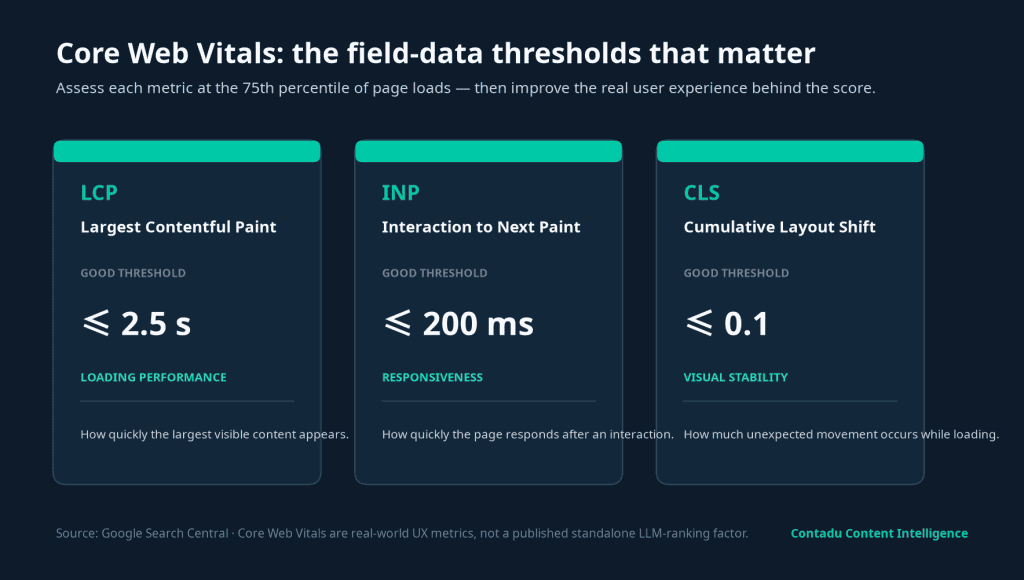
Google’s Core Web Vitals measure real-world loading performance, responsiveness, and visual stability. The current set is Largest Contentful Paint (LCP), Interaction to Next Paint (INP), and Cumulative Layout Shift (CLS). Google recommends good scores for Search success and a strong user experience.
| Metric | Good threshold | What users experience | Frequent content-template cause |
| LCP | 2.5 seconds or less | How soon the main visible content appears. | Slow server response times, an oversized hero image, render-blocking CSS, or delayed JavaScript rendering. |
| INP | 200 milliseconds or less | How quickly the page reacts after a user interaction. | Heavy event handlers, third-party scripts, a long task on the main thread, or an overloaded form. |
| CLS | 0.1 or less | Whether the layout stays where the reader expects it. | Images without dimensions, a late-loading web font, injected embeds, or modules without reserved space. |
These thresholds should be read as quality targets rather than guarantees. A good LCP occurs within the first 2.5 seconds of a page load. A good INP is below 200 ms. A good CLS score is below 0.1. Passing all three will not make weak content rank, but failure can damage the experience around a useful answer.
Why Page Experience Still Matters in AI Search.
Page experience helps an already relevant answer compete in the moments before and after discovery. Google explains that its ranking systems use a variety of signals aligned with overall page experience and warns that good scores alone do not guarantee high positions. Relevance remains the priority.
For AI search, the same principle applies. A page should be easy to crawl and clear enough to extract from, but its content also needs to answer the query directly.
A slow landing page cannot explain why your product is the right fit if the main content is delayed behind client-side rendering, a large media file, or an unstable layout. Conversely, a perfect performance report cannot compensate for an outdated product claim, thin evidence, or poor entity coverage.
There is also a conversion reason to care. A visitor arriving from an AI Overview, AI Mode, or a cited answer may be encountering your brand for the first time.
If the page is slow to load, unresponsive after a click, or shifts while they read, it introduces doubt before your supporting proof or CTA is visible. Good performance protects the trust created by discovery.
Prioritize LCP, INP, and CLS on High-Value Templates.
Start with the templates that carry your highest-value content and conversion journeys. For most B2B SaaS teams, that means product pages, comparison pages, pillar content, feature explainers, and articles that already attract qualified traffic.
Improve loading performance where the answer begins.
Identify the LCP element first. On an editorial or landing-page template, it is often the hero image, a large text block, or a featured visual.
Reduce Time to First Byte where the origin is slow, make the key resource discoverable early, and use image optimization rather than serving a much larger file than the viewport needs. The goal of LCP optimization is simple: help the reader see the page’s main purpose quickly.
Improve responsiveness where the visitor acts.
INP replaced First Input Delay (FID) as the responsiveness Core Web Vital. It captures the journey from an interaction through the point at which the browser can paint the next frame, rather than measuring only the initial delay.
Test the menu, in-content links, demo forms, calculators, video controls, comparison filters, and newsletter sign-up—not just the article body.
Protect visual stability where the visitor reads.
Reserve space for images, videos, consent tools, embeds, and dynamic CTAs. Set dimensions or an aspect ratio before a resource loads.
Check that web-font delivery does not create unexpected layout shifts. A low CLS score is not merely a technical benchmark: it protects the reader’s attention when they are trying to follow a paragraph, use a link, or complete a form.
Measure Field Data and Lab Metrics Together.
Use field data to understand the experience real users receive, and lab metrics to diagnose the performance issues behind it. Lab data is collected under predefined device and network conditions. Field data reflects actual users, their devices, network quality, geographies, and behavior.
The Chrome User Experience Report supplies the real-user dataset behind many Core Web Vitals views. A field score represents a distribution, not one page-load event; Google evaluates it at the 75th percentile of page loads over a 28-day collection period. That is why a PageSpeed Insights test can look different from Google Search Console’s Core Web Vitals report.
| Use case | Best source | What to inspect |
| Find URL groups that need attention | Google Search Console | Core Web Vitals report, device segment, affected page templates, and field-data trend. |
| Diagnose an individual page | PageSpeed Insights or Lighthouse | TTFB, First Contentful Paint, Total Blocking Time, dependency chains, image opportunities, and layout-shift events. |
| Verify the outcome of a release | Field data plus real-user monitoring | Changes in the real-world user experience after enough traffic and collection time. |
Do not mistake a Lighthouse performance score for a field result. Use lab testing to isolate a fix, then allow time for field data to confirm whether it improved the experience for mobile and desktop visitors. This separation makes technical discussions with developers more precise and prevents teams from optimizing a synthetic test while ignoring a real user problem.
A Six-Step Workflow for AI Search Readiness.
The objective is not to optimize every page equally; it is to improve the delivery of the content assets that earn visibility and drive meaningful actions.
- Choose the right pages. Prioritize pages with high organic value, important commercial intent, or a clear role in your content architecture.
- Review field performance. Use Search Console’s Core Web Vitals report to identify patterns across a template, not isolated URLs alone.
- Diagnose the cause. Use PageSpeed Insights, Chrome DevTools, or Lighthouse to analyze the LCP element, JavaScript, total blocking time, server response times, and layout stability.
- Fix the main-content path. Reduce unnecessary blocking resources; serve appropriately sized images; reserve layout space; defer non-essential scripts; and retain important content in the HTML response.
- Check AI-search fundamentals. Confirm that robots.txt permits crawling, internal links are crawlable, textual content is accessible, and structured data matches the page. These are Google’s stated best practices for AI features.
- Validate and document. Record the release date, rerun lab testing, and revisit field performance once enough new real-user data exists.
Set a Sensible Performance Standard.
Good Core Web Vitals are a service standard, not an isolated SEO target. Use page experience signals and performance data to decide where a release is genuinely needed.
If INP is the constraint, make the 200ms INP threshold the operational target: break up long JavaScript work, delay nonessential code, and test the exact interaction that visitors use. This is practical INP optimization, not a promise of an automatic AI-search uplift.
Apply the same discipline to every template. A healthy performance workflow turns a Core Web Vitals report into an evidence-based backlog: identify the user-facing problem, estimate the impact, deploy a fix safely, and confirm the outcome with field data. That is how good Core Web Vitals support durable visibility and a good user experience.
How Contadu Connects Performance With Content Visibility.
Core Web Vitals show whether your audience receives a page that loads, reacts, and stays stable. Contadu helps ensure that the page also contains the topical depth, entities, internal context, and answer-first structure that make a content asset worth retrieving.
Use Contadu to identify content gaps, create briefs around the concepts users and answer engines expect, and strengthen the internal links that connect a supporting article to the pillar page or product evidence behind it.
The result is a more useful prioritization model: improve performance on pages that do not merely load well, but also demonstrate expertise and contribute to measurable visibility.
Frequently Asked Questions
Do Core Web Vitals directly affect LLM rankings?
No major AI answer engine has published them as a standalone LLM ranking or citation factor. Google says that existing SEO best practices apply to AI features and that there are no additional technical requirements for AI Overviews or AI Mode. Treat these metrics as an indirect enabler of accessibility and experience, not a citation guarantee.
What are the three Core Web Vitals?
They are Largest Contentful Paint for loading performance, Interaction to Next Paint for responsiveness, and Cumulative Layout Shift for visual stability. Good scores are LCP at 2.5 seconds or less, INP at 200 milliseconds or less, and CLS below 0.1.
Does Google AI Overview use Core Web Vitals in its selection algorithm?
Google has not published a separate Core Web Vitals selection algorithm for AI Overviews. It says that usual SEO best practices remain relevant, that there are no special optimizations required, and that a supporting link must be indexed and eligible for a Search snippet.
Why do field data and lab data differ?
Lab data is measured in a controlled device and network environment. Field data measures real users across different devices, networks, locations, and browser behavior. Use lab metrics for diagnosis and field data to evaluate the real-world user experience.
How do I improve LCP on a content page?
Find the LCP element, then examine TTFB, the priority and size of that resource, render-blocking assets, and whether the main content depends on client-side JavaScript. In practice, LCP optimization often involves image optimization, earlier resource discovery, faster server delivery, and less render delay.
Did INP replace FID?
Yes. INP replaced First Input Delay as the Core Web Vital for responsiveness. It measures the full duration from a user interaction until the next frame can be painted, which makes it more representative of the delay a user perceives.
Should I fix Core Web Vitals before improving content?
Not automatically. If a page is blocked from crawling, has weak intent alignment, offers little evidence, or contains outdated information, address those problems first. Prioritize performance work where it improves the experience of a valuable page that already has a credible role in discovery or conversion.