
FAQ Page Content Strategy: When a Question Needs Its Own Page
Semantic Summary
Idea: FAQ content should route people to the right level of help, not store every answer in one long list.
Challenge: Important, changing, or complex answers become hard to find and easy to contradict when they are buried in a generic FAQ section.
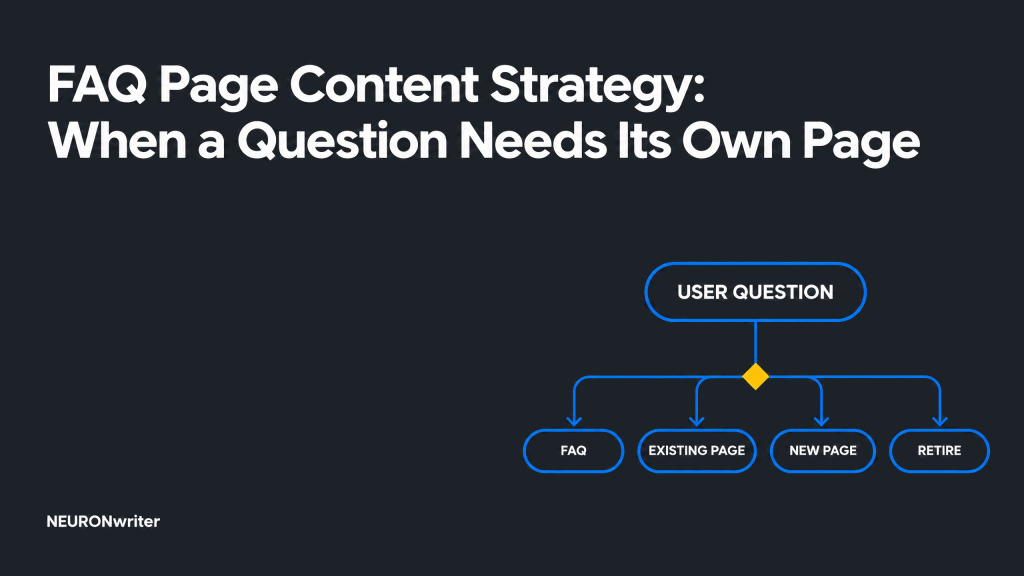
Summary: Use a simple decision rule to keep a short answer in an FAQ, expand an existing page, create a standalone page, or retire a duplicate.
Related Reads
- Help Center SEO: How to Write Documentation That Helps Users Succeed
- Content Conversion Paths: Designing the Route From Education to Demo
- Microcopy Best Practices: Small Words That Build Trust in Content Marketing
An FAQ answer needs its own page when a reader needs more than a quick fact: they need context, steps, proof, a comparison, or help making a decision. The purpose of FAQ content is not to squeeze every user question into a question-and-answer format. It is to make the right information easy to find, use, and maintain.
A good FAQ content strategy gives every recurring question a home. Some stay as concise answers on a relevant page. Some point to a detailed resource. Some expose a gap in your site and deserve a new page. Others are duplicates or no longer matter. This article provides the decision framework and governance process for making those choices without turning your FAQ page into a content dumping ground.
Start with the decision, not the FAQ format
An FAQ is useful only when it helps a person complete a small, specific information task quickly. A frequently asked question is a question that comes up often. It is not automatically the best heading, best page, or best answer format for every visitor.
Use these plain definitions before assigning work. An FAQ section is a short group of questions on a page that already has a clear primary purpose. An FAQ page is a focused destination for a narrow group of related recurring questions. A standalone answer page is a full resource built around one reader task, decision, or topic. It can include an FAQ, but it does not depend on the FAQ format to explain itself.
The governing question is simple: what must the reader be able to do after reading this answer? If the outcome is “remember one stable fact,” a concise answer may be enough. If the outcome is “choose an approach,” “configure something,” “understand a policy,” or “complete a task,” give the reader a page that carries the necessary content depth.
| Signal | Best home | Governance action |
| The answer is stable, narrow, low risk, and takes one or two short sentences. | FAQ section or focused FAQ page | Keep the FAQ answer concise; link to related pages only when a reader needs more. |
| The reader must follow steps, compare options, understand limits, or make a consequential choice. | Standalone page | Create a task-led page; let the FAQ point to it with a clear label. |
| The answer already belongs to a page with the same topic and reader intent. | Existing page | Expand the source page and use a short FAQ answer as a route, not a copy. |
| The question is old, duplicated, misleading, or based on a retired product, service, or policy. | Retire or merge | Choose one source of truth, update internal links, and follow the site’s established redirect process where needed. |
Why generic FAQ pages become a maintenance risk
A large FAQ page often starts with a helpful intention and ends as a list of unrelated answers. That format makes content harder to scan, harder to update, and harder for a support team to trust.
The problem is not that FAQs are bad. The problem is using them where purposeful information would work better.
Hidden answers force readers to guess.
A vague list of questions makes a reader translate their need into somebody else’s wording. “Can I do this?” may hide the fact that the reader needs setup instructions, a comparison, or a policy explanation.
Use task-led headings where they are clearer than a long question. Clear navigation and a search bar are often more valuable than adding another accordion row.
Duplicate answers drift out of sync.
Duplicating an answer across product pages, sales material, an FAQ page, and customer support documentation creates competing sources of truth. When a policy or workflow changes, one copy will eventually be missed. Keep the detailed answer in one maintained resource. Then use the FAQ answer to summarize and link to that source.
Stale answers create real uncertainty.
An outdated answer is worse than no answer when a reader relies on it for a purchase, a contract, a privacy choice, or a technical workflow. Give changing information an owner, a review date, and a trigger for review. A product update, policy change, or sharp rise in a search query should be enough to reopen the content.
Invented questions weaken trust.
Do not write a list of frequently asked questions because a page looks incomplete without one. Use real user questions from customer conversations, search behavior, and feedback. If a question is mainly a sales slogan in disguise, it belongs in neither an FAQ nor a standalone answer page.
What an effective FAQ is still good at
An effective FAQ gives quick answers to stable, narrow questions while preserving a clear path to deeper relevant content. It works well when a person needs one fact that does not require a long explanation: a simple availability detail, a definition with one agreed meaning, or a short clarification that prevents an unnecessary support request.
Keep an FAQ answer direct. State the answer first, then add one sentence of context if it changes what the reader should do. If the topic needs examples, exceptions, evidence, screenshots, or a decision tree, the FAQ should become a signpost rather than the destination. That is better for user experience and for the customer support team that must maintain the information.
Build your FAQ content strategy from real questions
Start with evidence, then group the questions by what the reader is trying to accomplish. Search volume can be one signal, but it cannot tell you whether a question is urgent, confusing, or costly when answered badly. A reliable list combines quantitative patterns with the people who hear the questions every day.
Collect questions from the right places.
Ask the customer service team and sales team which customer questions make a conversation stall or repeat. Review on-site search terms, feedback forms, onboarding calls, product-change notes, and Google Search Console queries. Mark the source and date beside every candidate question. One memorable complaint is useful context; a recurring pattern is stronger evidence for creating content.
Normalize wording before you count.
Different words can describe the same underlying need. Conversely, the same keyword can hide several different tasks. Group the list of questions by intent before you count frequency. For example, “How do I change access?” may refer to permissions, a billing plan, a password, or a workflow. Each needs a different answer and may belong on different related pages.
Record the minimum governance fields.
For every approved item, record the reader, task, source of evidence, current home, subject owner, source of truth, last review, and related questions. These fields make FAQ content management practical. They also show when a short answer has outgrown its original place.
Write and place answers so people can act
The most helpful FAQ answer starts with the direct answer in the first sentence. It then tells the reader what to do next, including a link when the deeper explanation lives elsewhere. This pattern helps users quickly find a useful answer without pretending every topic can fit in one paragraph.
Use a concrete question and a concise first sentence.
Write questions in language that reflects real user needs. Avoid broad headings such as “Can you help?” and promotional wording such as “Why are we the best?” A concise heading like “Changing account permissions” may be easier to scan than several versions of “How do I …?” When a question format is genuinely clearer, use it.
Link to depth without creating a dead end.
A link should name the next resource and the benefit of opening it. “Read the full permissions guide” is clearer than “Learn more.” The next page should fulfill the promise: it should explain the workflow, the limits, and the next decision. This supports navigation and creates a content path instead of a disconnected FAQ format.
Design for access before decoration.
An FAQ page should be easy to navigate on a small screen as well as a wide one. Use readable question labels, predictable headings, accessible interactive controls, and responsive design. Group only genuinely related questions. If the resource contains many topics, add meaningful categories and a search bar. Do not hide critical information behind an interaction that a reader may not notice or be able to use.
Use SEO and AI search as checks, not shortcuts
Clear FAQ content can support SEO and AI search because it gives site visitors and search systems a direct, visible explanation of a specific query. It cannot guarantee a search feature, an AI Overview, or an AI citation. The reliable objective is a helpful page that answers the audience’s question better than a thin list of keywords.
Google’s people-first guidance asks whether content provides original value, helps its intended audience achieve a goal, and leaves them with a satisfying experience.
Apply that test before publishing a new FAQ page. If the answer merely repeats what a stronger existing page says, improve the existing page instead.
Use Google Search Console to observe which search queries reach an answer, where people need more context, and which pages create impressions without useful engagement. Combine that information with support and on-site-search evidence. Organic traffic is a useful signal, but it is not proof that a person found the information they need.
FAQPage structured data describes visible question-and-answer content. It should match the answers a person can read on the page. It is not a reason to add low-value questions, and it is not a promise of a rich result: Google’s documentation changelog records the removal of FAQ rich-result documentation in 2026.Use valid Article structured data for this guide and consider FAQPage markup only when the on-page FAQ genuinely fits its requirements.
Govern the FAQ lifecycle instead of publishing and forgetting
The strongest FAQ content strategy treats every answer as a maintained content object. That means a named owner, a source of truth, a review trigger, and a decision about what happens when the answer changes.
Set review triggers that reflect the real world. Review an answer when a product or service changes, a policy changes, the support team starts correcting it, a new cluster of audience questions appears, or an existing page gains enough depth to replace it. A scheduled quarterly review can catch quieter drift, but it should not be the only safeguard.
Measure whether the content helps users, not just whether it was published. Look for reduced repeated confusion in customer support, fewer refinements in on-site search, successful movement to related pages, and feedback that confirms a task was completed. A call to action is useful only when it matches the question the reader came to solve.
Run a practical FAQ page review every quarter
A quarterly review keeps a helpful FAQ page aligned with real user questions instead of preserving an old list of frequently asked questions. Start with the answers that create the most support work, attract the most recurring search queries, or relate to products and services that changed since the last review.
Check question quality before you check keyword coverage.
Read the list of questions as a new site visitor would. Can a person quickly find the task they came to complete? Are the popular questions written in the language people actually use? Use real user questions and audience questions, then check search volume only as one piece of evidence. A keyword is helpful when it describes the user need; it is not a reason to create a weak FAQ answer.
Check whether the answer has the right depth and home.
Review each piece of content against the routing framework. A concise answer is right for a quick clarification. A page with examples, exceptions, or a workflow needs enough content depth to help people decide or act. Where an existing guide can answer the question better, make that page the source of truth and make the FAQ link descriptive.
Check the experience around the answer.
An effective FAQ page is easy to navigate, user-friendly, and clear about its scope. Check page design, headings, link labels, and responsive design on common screen sizes. On a larger FAQ resource, test whether categories and the search bar help people find answers to their questions without adding unnecessary steps. This is content optimization for customer experience, not decoration.
Check evidence and outcomes.
Use Google Search Console to compare search results, organic traffic, and the queries that lead to the page. Then ask the support team and customer support team whether the answer reduces repeated explanation. This closes the loop between digital marketing data and the experience of people answering questions every day.
FAQ page examples: apply the routing rule
The best FAQ is not the longest list. It is the smallest answer set that lets a reader resolve a real, recurring need without concealing the information they need. These examples of FAQ pages show how the same content strategy creates different homes for different questions.
A stable, one-sentence clarification stays in the FAQ section.
Consider a reader asking whether a standard confirmation message is sent after a request. The answer is stable, needs no exception list, and helps a reader move on. Keep it as a concise FAQ answer on the relevant contact or request page. This is an effective FAQ section because it removes a small doubt where it occurs.
A changing workflow needs a dedicated guide.
Now consider a reader who asks how to change permissions for several people, what each role can do, and what happens after a change. That is not one question; it is a task. Create an FAQ page only if the questions remain narrow. Otherwise, create a standalone guide with clear steps, related questions, and one maintained source of truth.
A broad buying question belongs with the decision content.
A question about which option fits different products and services may appear frequently, but it needs comparison criteria and context. Add the answer to the relevant product or service page, or create a decision guide if there is no natural home. The FAQ can still offer a short route, but it should not become the only place a site visitor can learn more about a consequential choice.
How Contadu can support FAQ content planning
Contadu can help a team turn scattered audience questions into a governed content workflow. Start by collecting question themes from briefs, search research, support insights, and stakeholder input. Then group similar queries by intent before asking whether they need an FAQ answer, a revised page, or a new resource.
Use the planning workspace to assign an owner, connect related pages, and set a review task when a high-risk answer changes. Before creating a standalone page, compare the planned topic with the existing cluster to avoid duplicate content. For the final brief, specify the reader task, the source of truth, the direct answer, evidence to verify, links to related pages, and the action a reader can reasonably take next.
That approach turns FAQ content creation from an afterthought into a traceable editorial decision. It also gives writers and reviewers a shared standard: each piece of content must help a person find answers to their questions without making the site harder to maintain.
FAQ
What is an FAQ content strategy?
An FAQ content strategy is the set of rules a team uses to collect user questions, decide where answers should live, keep them accurate, and measure whether they help. It treats an FAQ page as one possible format, not as the default home for all knowledge.
When should an FAQ answer become a standalone page?
Create a standalone page when a reader needs steps, context, comparisons, evidence, exceptions, or a decision that would make a short FAQ answer incomplete. It is also appropriate when the question has strong recurring demand, a high consequence of error, or a clear need for public discovery.
How long should an FAQ answer be?
Make an FAQ answer long enough to give a true direct answer and the next useful action, usually a short paragraph. Do not cut essential context just to keep a response brief. If the explanation needs several sections, create an FAQ page or a standalone resource and use the short answer as a route.
Should every website have a separate FAQ page?
No. A separate FAQ page is useful when a focused set of recurring questions shares the same audience and purpose. If questions belong to product, service, documentation, or policy pages, putting the answers there may give a better customer experience and clearer navigation.
Is FAQ content good for SEO?
FAQ content can support SEO when it gives a complete, visible answer to a real query and connects readers to deeper relevant content. It should not be written to chase a feature in search results. Helpful content, strong page structure, accessibility, and accurate maintenance matter more than adding a large list of questions.
Should I use FAQPage structured data?
Use FAQPage structured data only when the page contains visible, accurate question-and-answer content that the markup describes. Do not add it as a promise of enhanced search appearance. Keep the markup aligned with the page and follow current search-engine documentation as feature eligibility changes.
How do I find the right questions for an FAQ page?
Start with real user questions from customer support, sales conversations, on-site search, feedback, and search-query patterns. Group them by task and intent, then check whether an answer already exists. Prioritize questions that occur repeatedly, block a user task, or expose a gap in products and services information.