
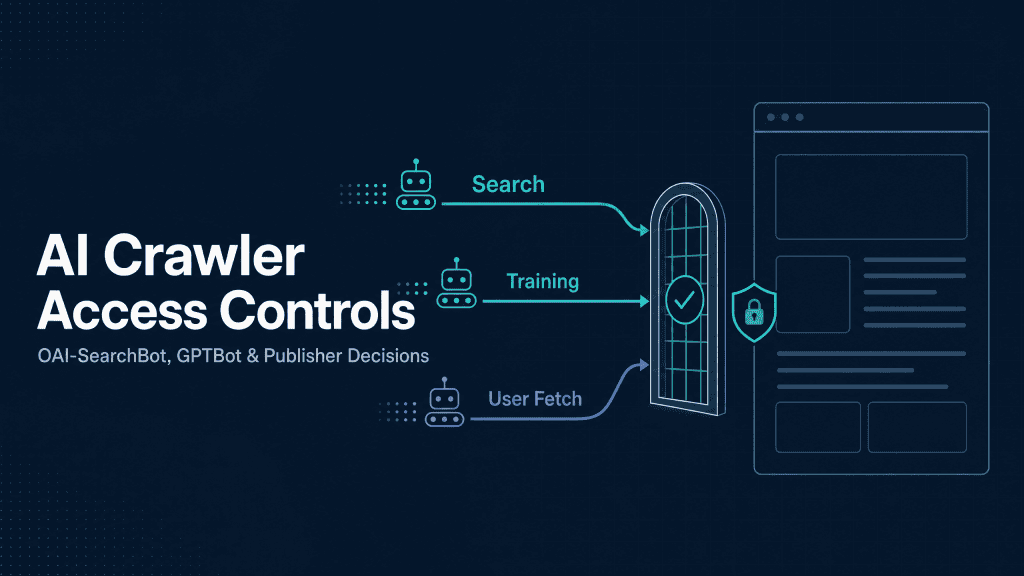
AI Crawler Access Controls: OAI-SearchBot, GPTBot, and Publisher Decisions
Semantic Summary
The Idea: AI crawler access is not one decision. OpenAI documents separate roles for OAI-SearchBot, GPTBot, and ChatGPT-User. A publisher can allow automated discovery for ChatGPT search while separately expressing a preference against model-training use.
The Challenge: Broad robots.txt rules, CDN or WAF settings, and stale plugin configurations often treat every AI bot as identical. That can create an unintentional gap between a publisher’s actual content policy and the access rules deployed on the website.
The Solution: Define a policy by crawler purpose, implement explicit and reviewable rules, then verify the complete delivery path: robots.txt, edge controls, HTTP responses, rendering, and logs. Access is a technical baseline, not a promise of ranking, citation, traffic, or commercial outcome.
Related Reads
Most website teams can find /robots.txt. Fewer can explain what their current policy means for a search crawler, a training crawler, and a visit made on a user’s behalf. That distinction now matters in technical SEO, content governance, privacy review, and AI-search strategy.
The practical question is not, “Should we block AI?” It is: which automated access do we allow, for what purpose, on which public content, and how will we verify that the deployed controls match that decision? This guide provides a defensible framework for answering it.
What Publisher Decision Are You Actually Making?
Before editing a rule, separate three objectives that are often collapsed into one broad policy. A publisher may want pages to be eligible for automated search discovery, may prefer not to have content used to improve generative AI foundation models, and may still need to think differently about a request initiated directly by a product user.
OpenAI states that OAI-SearchBot is used to surface websites in ChatGPT search features, while GPTBot crawls content that may be used to train its generative AI foundation models. The company also says these settings are independent: a site owner can allow OAI-SearchBot while disallowing GPTBot.
This turns an apparent binary choice into a policy design exercise. The right answer depends on the public content you publish, contractual obligations, product surface, resource constraints, privacy posture, and commercial goals. It should be documented as a business decision with technical implementation not delegated to a blanket default created years ago.
| Decision area | Operational question | Example policy outcome | Evidence to retain |
| AI search discovery | Should public pages be available to an automated search crawler? | Allow the relevant search crawler on intended public paths. | Approved policy owner, robots.txt version, and access test. |
| AI training | Should public content be available for potential foundation-model training? | Disallow the relevant training crawler if that matches the organisation’s policy. | Policy rationale, legal review where needed, and review date. |
| User-initiated fetch | How should a page behave when a user asks an AI product to visit it? | Use application-layer controls for genuinely restricted information. | Authentication model, response behavior, and security review. |
OAI-SearchBot vs. GPTBot vs. ChatGPT-User.
These user agents should not share a single assumption. They have different documented purposes and, therefore, require different publisher decisions.
| User agent | Documented purpose | What robots.txt controls | Publisher takeaway |
| OAI-SearchBot | OpenAI says it is used to surface websites in ChatGPT search features. | OpenAI documents OAI-SearchBot as the control for search opt-outs and automatic crawl. | Decide whether eligible public content should be available to this search crawler. |
| GPTBot | OpenAI says it crawls content that may be used to make generative AI foundation models more useful and safe. | Disallowing GPTBot expresses a preference that content not be used for that training purpose. | Treat training preference separately from AI-search discovery. |
| ChatGPT-User | OpenAI says it may visit a page for certain user actions in ChatGPT and Custom GPTs. | OpenAI cautions that, because actions are user initiated, robots.txt rules may not apply. | Do not rely on a crawler directive to protect genuinely private or regulated content. |
OAI-SearchBot: Search Discovery for ChatGPT Features.
OAI-SearchBot is the relevant OpenAI crawler when the question is automatic access for ChatGPT search features. OpenAI recommends that sites aiming to appear in these search results allow OAI-SearchBot in robots.txt and allow requests from the company’s published IP ranges. It notes that changes to robots.txt may take around 24 hours to take effect in its systems.
That documentation should be interpreted precisely. Allowing a crawler creates a path for crawl access; it does not guarantee that a page will appear in an answer, earn a citation, rank for a query, or produce traffic. Content quality, relevance, accessibility, freshness, authority, query interpretation, and product behavior still matter.
GPTBot: Training Preferences for Generative AI Foundation Models.
GPTBot addresses a different concern: whether content crawled by that user agent may be used to train OpenAI’s generative AI foundation models. A publisher may choose to disallow GPTBot for public content while allowing OAI-SearchBot for automatic search discovery. This is the most important distinction to make before copying any generic “block AI bots” rule.
For organisations with proprietary research, paid databases, content-licensing terms, regulated subject matter, or contractual duties, this decision should be reviewed with the relevant legal, privacy, information-security, and commercial stakeholders. This article provides operational information, not legal advice.
ChatGPT-User: User-Initiated Fetches Are a Different Case.
ChatGPT-User is not described by OpenAI as an automatic web crawler for search inclusion. It may visit a page after a user action, and OpenAI states that robots.txt rules may not apply in that context.
The practical lesson is broader than one user agent: public crawl directives cannot replace authentication, authorization, paywalls, signed URLs, or other application-layer controls when information must be protected.
How robots.txt Controls AI Crawler Access.
The Robots Exclusion Protocol defines a text file at the top-level /robots.txt path. It uses groups with User-agent lines and access rules such as Allow and Disallow. Where rules conflict, the protocol uses the most specific matching path; if an explicit user-agent group is absent, a crawler may use the wildcard group when one exists.
The Rules That Matter: User-agent, Allow, and Disallow.
For a publisher whose policy is to keep automatic ChatGPT search discovery available while expressing a no-training preference for GPTBot, a minimal starting pattern could be:
User-agent: OAI-SearchBot
Allow: /
User-agent: GPTBot
Disallow: /
This example is deliberately simple. It is not a universal recommendation, nor does it account for a site’s current wildcard rules, subdomains, application paths, CMS behavior, edge controls, or contractual obligations.
Every rule should be tested against the actual public URL patterns the organisation intends to govern.
A selective path-level policy is possible, but it increases review overhead. When the policy intent is “public marketing and documentation content may be crawled; private application surfaces may not,” the cleaner approach is often to ensure the private surface is truly protected and to keep automatic crawlers focused on public, accessible content.
What robots.txt Cannot Secure or Guarantee.
robots.txt is not an access-control system. RFC 9309 explicitly states that the protocol’s rules are not a form of access authorization. Google similarly explains that robots rules cannot enforce crawler behavior and should not be used to keep sensitive pages secure.
That has three immediate consequences. First, do not place sensitive URLs in a file and assume they are protected. Second, do not interpret a permissive rule as proof that a crawler successfully reached the page.
Third, do not interpret a disallow rule as a complete solution to visibility, security, licensing, or abuse concerns. Use credentials and application-layer controls for content that should not be publicly reachable.
Example Policy Patterns for Public, Restricted, and Private Content.
| Content class | Primary control | Role of robots.txt | Review owner |
| Public editorial, feature, pricing, and documentation pages | Clear crawler policy plus technically accessible public pages | Express the intended access posture for named crawlers. | SEO and content operations |
| Low-value utility URLs, parameter variants, or internal search results | Technical SEO controls and canonical URL strategy | Reduce unnecessary crawling where appropriate. | SEO and engineering |
| Authenticated app, customer data, or internal tools | Authentication, authorization, and secure server behavior | Supplementary only; never the security boundary. | Security and engineering |
| Licensed, regulated, or contractually restricted material | Formal governance and access restrictions | One policy signal among several, after review. | Legal, privacy, security, and content owner |
Build a Publisher Decision Framework Before Editing Rules.
The strongest AI crawler policy begins with a content inventory rather than a bot list. Inventory the public parts of the site, classify content by business and compliance risk, identify the named crawler’s purpose, and state who owns each decision. This makes future reviews repeatable when a new model, user agent, CDN setting, or product surface appears.
Map Content Classes and Business Risks.
Create a short register for your domain: public editorial content, product marketing, help centre articles, documentation, customer portals, application routes, internal tools, and sensitive datasets. For each area, document whether it is intentionally public, whether it is suitable for AI-search discovery, whether it has a separate training policy, and whether it relies on true authentication.
This work also improves traditional technical SEO. It reveals parameter URLs, duplicate routes, orphaned resources, blocked scripts, and public pages that should be represented consistently in a sitemap and internal-linking structure. For a related architectural approach, see How to Optimize Your Site Architecture for AI Crawlers.
Choose a Policy by Purpose, Not by Bot Category.
“AI bot” is not a sufficiently precise governance category. A crawler used for search retrieval is different from one associated with AI training, and both differ from a user-triggered fetch. Record the intended policy in plain language first. Only then translate it into named user-agent rules, edge settings, and monitoring criteria.
A good policy statement is specific enough to test. For example: “We allow named automated search crawlers to access public English editorial and product pages; we disallow named training crawlers pending annual review; customer and internal routes require authentication regardless of crawler identity.” The statement can be revised, but it gives engineering and content teams a shared operating model.
Record Ownership, Review Date, and Exceptions.
Assign an owner for the file and a review cadence. A quarterly technical review is a reasonable operational rhythm for fast-moving bot policies, with an immediate review after CDN/WAF migrations, a CMS change, an access incident, or material changes to a provider’s crawler documentation. Add exceptions explicitly rather than burying them in a generic wildcard block.
Audit Beyond robots.txt: CDN, WAF, Rendering, and Logs.
A correct robots.txt file is necessary but not sufficient. Requests can be denied or altered by a CDN, web application firewall, bot-management product, origin server, CMS plugin, authentication layer, or JavaScript-dependent rendering. Treat access as an end-to-end system.
Check CDN and Bot-Management Layers.
Review CDN and WAF settings for broad AI, automation, scraper, threat-score, rate-limit, or bot-category rules. Confirm that an intended search crawler is not denied at the edge while robots.txt looks permissive. Conversely, if the organisation has chosen to restrict a bot, make sure the technical controls and the documented policy are consistent.
Do not use a user-agent string alone as proof of crawler identity. When you assess logs or configure exceptions, compare requests with the vendor’s current published IP-range guidance and your own server evidence. OpenAI publishes IP-range references for its documented crawlers.
Verify Legitimate Requests and Response Codes.
For each crawler policy change, test the public /robots.txt response first. It should load from the intended protocol, host, and subdomain. Then verify that a representative public page returns a successful status code without redirect loops, authentication gates, interstitials, or essential assets blocked by the delivery stack.
Use server or CDN logs to look for the named user agent, requested paths, status codes, response times, and edge actions. Log File Analysis for AI Bot Crawl Budget explains how to turn that raw evidence into a repeatable crawlability review. The point is not to inflate bot activity; it is to detect a mismatch between intended policy and observed behavior.
Confirm the Public Content Is Crawlable and Useful.
Access alone does not make a page useful for AI search or any search engine. Make public content reachable through internal links, available without a login, served with meaningful HTML, and consistent with the canonical URL, visible page copy, and structured data. Use advanced schema practices for AI answer engines to clarify page entities and relationships, not as a substitute for clear content.
A 10-Minute AI Crawler Access Audit
Use this compact audit whenever you deploy a new crawler policy or begin a GEO initiative. It is intentionally operational: it validates intent before discussing visibility metrics.
- Open the exact https://yourdomain.com/robots.txt URL and record its status code, content, and cache behavior.
- Search for explicit groups covering OAI-SearchBot, GPTBot, and any other crawler relevant to your documented policy.
- Check the wildcard User-agent: * group. If a named group is missing, the wildcard rule may become the effective posture for that crawler.
- Compare each rule with the written decision: training, automated search discovery, and user-initiated fetches are separate questions.
- Review CDN, WAF, bot-management, firewall, and rate-limit settings for conflicting decisions.
- Test representative public URLs for successful responses, complete server-rendered main content, and accessible critical resources.
- Review logs for user agent, published-IP verification, requested URL, response status, and block reason where available.
- Check the sitemap and internal links for the public content you actually want crawled and understood.
- Record the policy owner, change date, exceptions, and the next review date.
- Measure downstream visibility separately. Use LLM visibility metrics to evaluate outcomes without confusing crawl access with citation or conversion performance.
How Contadu Helps Turn Crawler Policy into Content Governance.
Crawler policy tells you whether a compliant automated system can reach your public content. Contadu helps teams answer the next content-operations questions: which pages represent the entity and topics you want to own, where important information is missing, how content relates within a semantic cluster, and which refresh priorities should be addressed first.
That makes technical access part of an editorial workflow rather than a one-off configuration task. Teams can use Contadu to consolidate competing pages, build content briefs around real search intent, identify entity gaps, strengthen contextual internal links, and track whether high-priority topics become more consistently represented across the site. The right workflow is sequential: first make the intended content accessible, then make its meaning explicit, then evaluate visibility and business impact.
Frequently Asked Questions
What is OAI-SearchBot?
OAI-SearchBot is an OpenAI crawler used to surface websites in ChatGPT search features. OpenAI documents it as the crawler publishers should address in robots.txt when managing automatic search crawl and search opt-outs.
How does OAI-SearchBot differ from GPTBot?
OAI-SearchBot relates to automatic search discovery in ChatGPT search features. GPTBot crawls content that may be used for training OpenAI’s generative AI foundation models. OpenAI states that the settings are independent, so a publisher can allow one and disallow the other.
Should I allow OAI-SearchBot in robots.txt?
It depends on whether your organisation wants eligible public pages available to the automated crawler used for ChatGPT search features. Decide after considering public-content strategy, privacy, resource management, licensing, and legal obligations. Allowing it does not guarantee citations, rankings, traffic, or commercial results.
How do I block OAI-SearchBot?
Use a named group in the top-level /robots.txt file, such as User-agent: OAI-SearchBot followed by Disallow: /. Test the deployed file and also check CDN/WAF controls, because a policy is only reliable when the full delivery stack agrees.
Can robots.txt protect private content?
No. The Robots Exclusion Protocol is not authorization, and Google warns that robots rules cannot enforce crawler behavior or reliably hide a page. Protect private content with authentication, authorization, and appropriate application-layer security controls.
Does blocking GPTBot block ChatGPT Search?
OpenAI documents GPTBot and OAI-SearchBot as separate settings with separate purposes. Disallowing GPTBot expresses a training preference; OAI-SearchBot is the relevant crawler for automatic search opt-outs and search discovery.
How do I verify whether an AI crawler can access my site?
Review the exact /robots.txt file, inspect wildcard and named user-agent groups, check CDN/WAF and bot-management rules, test representative public URLs, and review request logs. Validate claimed crawler identity against the relevant vendor’s published documentation and IP-range guidance rather than a user-agent string alone.