

GA4 for Content Marketing: A Practical Setup and Reporting Guide
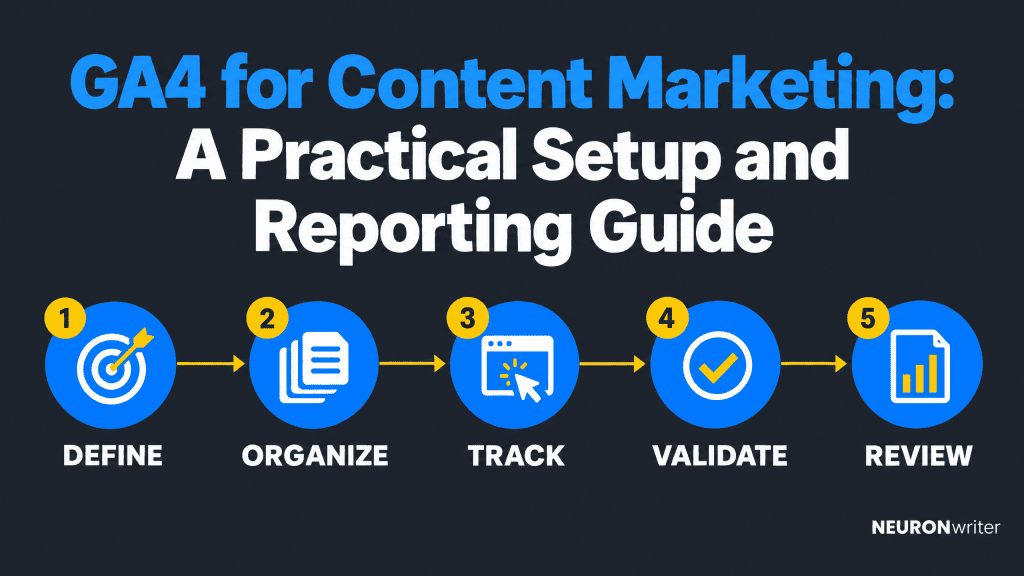
Semantic Summary
Idea: GA4 becomes useful for content marketing when tracking is planned around decisions, not a long list of clicks.
Challenge: Default reports show activity, but unclear events, page labels, and goals make it hard to tell which content helps readers and the business.
Summary: Define outcomes, organize content groups, measure a few meaningful interactions, validate the data, and review it in reports that lead to specific editorial actions.
Related Reads
- Content ROI: How to Measure What Actually Matters (and Prove It to Your CFO)
- Content Conversion Paths: Designing the Route From Education to Demo
| Step | What the team decides | What to check |
| 1. Define | What business or reader outcome should content support? | One primary outcome and a small set of supporting signals |
| 2. Organize | How should pages be grouped for useful comparisons? | Consistent page titles, paths, and content groups |
| 3. Track | Which interactions are meaningful enough to measure? | Existing events first; a few well-named custom events only when needed |
| 4. Validate | Is the data arriving once, with the right details? | Realtime, DebugView, consent behavior, and duplicate checks |
| 5. Review | What should we improve, keep, or investigate? | Page, source, engagement, and key-event evidence over a defined period |
GA4 for content marketing works best as a simple measurement system: connect a reader or business question to a measurable action, check that the event is collected accurately, then use reports to decide what to do next. Start with the standard reports and events already available. Add custom tracking only when it answers a question the defaults cannot.
What GA4 Can and Cannot Tell a Content Team
Google Analytics 4 (GA4) records website or app interactions as events. It can show which pages attract visitors, how people engage, where sessions come from, and whether selected actions occur. It cannot prove that a page caused a sale or explain why someone found it helpful.
That distinction matters. Views, active users, engagement time, and key events are signals with different meanings. A high view count can indicate reach; it is not a quality score. Longer engagement may be useful for a detailed guide, but a short visit may be successful if the page gives a quick answer. Interpret each metric in the context of the reader’s task and the page’s purpose.
Universal Analytics and GA4 reporting models are not interchangeable; use current GA4 metric definitions.
GA4 uses events to record interactions across a website or app, subject to implementation and consent settings. It can reveal patterns in content consumption, but it cannot explain audience intent on its own.
GA4 data also reflects the site’s implementation, consent choices, and reporting configuration. Missing or duplicated events can distort conclusions. Treat analytics as evidence to investigate not as a complete record of every person’s behavior or a substitute for customer feedback, sales context, or search performance data.
Start With the Decisions You Need to Make
Before changing a tag or report, write down the decision your team wants GA4 to support. A useful question is specific enough to influence an action: “Which guides help visitors reach the product education page?” is more actionable than “How is our content doing?”
Ask whether a page helps new users find a resource, returning readers engage with a series, or visitors complete a conversion event. These questions need different metrics.
Choose one primary question for each report: for example, whether organic search brings people to a guide, readers open a related resource, or visitors complete a signup. Decide who will use the answer and what they might change. If no decision follows, leave the metric out of the first dashboard.
Define the review period and compare equivalent dates. Note publication dates, campaigns, and major site changes so the team can interpret shifts in the data.
Build a Practical Content Measurement Plan
A measurement plan connects editorial goals to GA4 data. It should fit on one page and clarify what the team wants to learn, which action represents progress, and where that data will appear.
Choose business outcomes and supporting signals
Separate outcomes such as qualified inquiries from supporting signals such as related-page visits.
Define each outcome’s event and trigger; a form-completion event should fire only after successful submission.
Map each question to an event, breakdown, and decision. Example: compare guide readers reaching product education by content group, then improve the relevant link.
Decide which content groups and page dimensions matter
Use a content taxonomy that supports real comparisons. You might group pages by format (guide, case study, product education), topic cluster, funnel role, or audience. Choose one or two dimensions first; too many labels create work without improving the decision.
GA4 content groups place pages into custom buckets in reports. Apply them consistently using templates, CMS fields, or URL patterns.
Keep page titles and paths consistent. Do not change URLs only to simplify analytics; use a reporting dimension or content group when appropriate.
Set Up Content Events Without Tracking Every Click
Begin with the events GA4 already collects, then add only the events needed to answer your measurement questions. An event is a recorded interaction or occurrence—for example, a page view, a file download, a video play, or a completed form.
Check automatically collected and enhanced measurement first
Review automatic and enhanced measurement first. Page views, outbound clicks, or file downloads may already be recorded, depending on your configuration. Test the behavior on your site; duplicating an existing event can inflate counts.
When the default event is sufficient, use it and make the report clearer with the right dimensions or filters. For instance, a file download event may need a file name or page path to identify which resource was downloaded. Add custom parameters only when they answer a real reporting question.
Name custom events and parameters consistently
Use stable custom event names and pass useful details, such as content type, as parameters.
Use recommended event names where relevant. Google Tag Manager can help implement tags; document their meaning, register needed custom dimensions, and never send personal information in event parameters.
Validate events in Realtime and DebugView
Test the complete action before relying on a report. Confirm the event in Realtime, then inspect its parameters in DebugView. Check that it fires once after success not after a failed or abandoned action.
Test under actual consent conditions, filter internal traffic, and record tracking changes.
Mark Key Events for Real Outcomes
A key event represents an important business action; do not mark routine engagement as one.
Separate engagement signals from business outcomes
A scroll, video play, or visit to a second page may help explain engagement. A completed signup or qualified request may be a business outcome. Those two types of actions can both matter, but they should not be presented as equivalent. Keep a small list of key events and state what each one means in plain language.
For example, a content team might track a resource download as a supporting action and a verified contact request as a key event. The first suggests interest; the second is closer to an outcome. The right setup depends on the business process and on whether the event is collected reliably.
Avoid duplicate or inflated conversions
Check for duplicate tags and ensure events fire only after successful actions.
Tracking changes affect future reports, not historical data; note them when comparing periods.
Build the Reports Content Marketers Will Use
Start with reports connecting page performance, traffic source, engagement, and meaningful outcomes. A focused dashboard is easier to maintain and more likely to shape decisions.
A lean dashboard shows landing pages by group, page engagement, traffic source, and key events. Name an owner and decision.
When the question is who engages with content, use demographic details only if they are available, appropriate, and useful for the decision. Do not collect or infer personal information unnecessarily. A short report that surfaces valuable insights for a specific audience is more useful than a demographic breakdown that does not change the content plan.
Landing pages and Pages and screens
Use the Landing page report to assess the first page in a session. Use Pages and screens to review pages visited more broadly; the reports answer different questions.
Filter by path or title; review views, active users, engagement time, and relevant events. Compare similar pages. Engagement rate and bounce rate do not show whether the reader’s question was answered.
Traffic acquisition and organic search context
Traffic acquisition shows where sessions came from, including source, medium, campaign, and channel group. It is not a complete customer journey. Use consistent campaign tags so newsletters and promotions are not split across labels.
Traffic acquisition reports session sources; user acquisition reports how users were first acquired. Use the former to compare content campaign sessions. Paid activity is distinct from organic search.
Pair GA4 with Google Search Console for search impressions, clicks, and queries. GA4 shows on-site activity; Search Console reports search-result performance.
Content groups, engagement, and path exploration
Compare related page groups for active users and meaningful actions. Path exploration shows observed sequences, not causation.
Keep reports focused; check registration, processing, and filters when data is missing.
Define each metric and denominator in a short dashboard glossary so the team interprets engagement rate, bounce rate, average engagement time, and conversion rate consistently.
Turn GA4 Data Into Editorial Decisions
Analytics becomes useful when a pattern leads to a concrete next step. If a guide attracts organic visitors but few continue to a relevant resource, check whether the internal link is visible and useful. If a content group has strong engagement but few key events, review whether the expected next action matches reader intent and appears at the right stage.
Look for both high-performing content and pages that need investigation. A page with many views and low engagement may have an expectation mismatch, a slow or confusing experience, or a quick answer that satisfies the reader. Check the query, the page itself, and feedback before rewriting it. Similarly, low traffic does not always mean a page is poor; it may serve a narrow but valuable audience.
Record the observation, evidence, decision, and next review date. If organic visitors rarely continue from a topic group to product education, check internal links and the destination promise before revising the article.
No single metric proves content impact. Combine analytics with search, customer, and business context.
Common GA4 Content Measurement Mistakes
- Tracking too much: dozens of events make the report harder to read. Start with the smallest useful set.
- Counting clicks as outcomes: a button click is not necessarily a successful signup or request. Track completion where possible.
- Comparing unlike pages: compare pages with similar purpose, audience, and time live.
- Ignoring naming and taxonomy: inconsistent page labels, event names, and campaign tags fragment the data.
- Assuming engagement equals quality: engagement time and bounce rate need context; neither alone explains whether the page helped.
- Expecting custom data immediately: custom parameters may need registration and processing time before they become available in reports.
- Overstating attribution: a path or source report can show observed journeys, but it cannot prove causation by itself.
Consent, tracking changes, migrations, and audience mix can affect comparisons; check these before rewriting content.
A 30-Day GA4 Content Measurement Rollout
Use this four-week rollout to build a first version, adjusting for your implementation requirements.
- Week 1: Define. Choose two or three content questions, one primary outcome, and a short list of supporting metrics. Write definitions where the whole team can find them.
- Week 2: Organize. Review page titles, URL patterns, campaign tags, and content groups. Agree who owns changes to the taxonomy.
- Week 3: Instrument and test. Audit existing events, add only necessary tracking, and validate each event and parameter in Realtime or DebugView. Document consent behavior and filters.
- Week 4: Report and decide. Create or customize a concise report, review it with content and analytics stakeholders, and choose one editorial action to test. Set a date to review whether the action helped.
If implementation requires development or consent review, prioritize data quality before adding reports.
How Contadu Supports the Content Planning and Optimization Workflow
Contadu supports the planning and creation side of a content measurement workflow; it does not replace GA4 instrumentation or analytics reports. Its Content Strategy features can help teams organize topics, identify content gaps, and plan a connected set of assets. Content Designer can help structure briefs and articles around a chosen topic and reader intent.
GA4 measures configured interactions; content planning helps choose what to create or improve next.
FAQ
What should content marketers track in GA4?
Track page performance, traffic source, engagement, and a few events tied to content goals. Separate business outcomes from supporting signals.
How do you measure blog performance in GA4?
Use Landing page data to assess articles that begin sessions and Pages and screens to review page activity more broadly. Compare similar articles over a defined period, then review relevant events and traffic sources. Use search-performance data from Search Console as a complement when you need impressions, clicks, or query context.
Which GA4 events are useful for content marketing?
Useful events may include a completed signup, resource request, download, or video interaction if it answers a defined question. Check existing measurement first and validate any custom event.
What is the difference between an event and a key event in GA4?
An event records an interaction or occurrence. A key event is an event that the organization has identified as important to its success, such as a completed qualified inquiry. Not every click or engagement event should be marked as a key event.
Can GA4 show which content drives leads?
GA4 can show observed pages and traffic sources associated with a lead event, but cannot prove that one page caused the lead. Combine it with sales and customer context.
How should a team group content in GA4?
Choose a small taxonomy that supports decisions, such as content format, topic cluster, or audience. Apply grouping consistently through a stable CMS field, page rule, or event parameter, and confirm the group appears in reports. Avoid creating labels that overlap or change from one article to another.
How often should content teams review GA4 reports?
A monthly review is a practical starting point for most editorial teams, with more frequent checks for a launch or active campaign. Review the same definitions and date ranges over time, and note major site or campaign changes. Make a decision log so each review results in a clear next action or a reason to wait for more data.
