

The Content Cannibalization Playbook: How to Find and Fix It Before It Kills Your Rankings
You’ve just published a massive, 3000-word guide on “B2B Content Marketing.” It’s your best work yet. You wait a few weeks, check Google Search Console, and… nothing. It’s stuck on page 4. Frustrated, you do a quick Google search for your target keyword. You find your site on page 2, but it’s not your new guide. It’s a mediocre, 500-word blog post you wrote three years ago.
You are a victim of content cannibalization. Your own website is eating its own potential.
As your blog grows past 50, 100, or 500 articles, content cannibalization transforms from a minor annoyance into the silent killer of your SEO strategy. When multiple pages on your site compete for the same search intent, you confuse Google, dilute your link equity, and artificially cap your own rankings.
This playbook provides a step-by-step framework to diagnose, treat, and prevent content cannibalization. We will move beyond the basic “don’t use the same keyword twice” advice and explore intent-based consolidation, ensuring every page on your site has a unique, profitable purpose.
What Content Cannibalization Actually Is (And What It Isn’t).
The biggest misconception about cannibalization is that it’s strictly about keywords. It is not about keywords; it is about Search Intent.
If you have two pages that target the exact same keyword but serve entirely different intents (e.g., a pricing page vs. an educational blog post), they are not cannibalizing each other. Google is smart enough to show the pricing page to someone searching “buy [product]” and the blog post to someone searching “what is [product].”
Cannibalization occurs when two or more pages target the same intent and the same audience.
The Symptoms of Cannibalization
How do you know if your site is suffering from this? Look for these three classic symptoms:
1.The Ranking Yo-Yo: Your ranking for a specific keyword fluctuates wildly from day to day (e.g., Position 4 on Monday, Position 18 on Tuesday). This means Google is constantly swapping which of your pages it thinks is the best result.
2.The Wrong Page Ranks: Like the scenario in the introduction, an older, lower-quality, or less relevant page outranks your newly optimized, comprehensive content.
3.Stagnant Traffic Despite High Quality: You have an incredible piece of long-form content that simply refuses to break onto the first page, despite having great backlinks and a high information gain score.
The Expert Insight: Cannibalization doesn’t just hurt your rankings; it destroys your conversion rate. If Google chooses to rank an old, top-of-funnel informational post instead of your high-converting, bottom-of-funnel landing page, you are losing money every single day.
How to Find Cannibalization Before It’s Too Late.
Finding cannibalization is a mix of intuition and hard data. You cannot rely on a single tool; you need a multi-layered approach to uncover the overlapping intent.
Method 1: The “Site: Search” (Quick & Dirty)
This is the fastest way to check if you have a problem with a specific topic. Go to Google and type:
site:yourdomain.com “target keyword”
For example: site:contadu.com “content strategy”
Google will return every page on your site that mentions this keyword. If the top 3-4 results look like they serve the exact same purpose (e.g., three different beginner guides to content strategy), you likely have cannibalization.
Method 2: Google Search Console (The Data-Driven Approach)
This is the most accurate method because it uses Google’s actual performance data.
1.Open Google Search Console and go to Performance > Search results.
2.Click + New and select Query. Enter your target keyword (e.g., “b2b content marketing”).
3.Ensure both Total Clicks and Total Impressions are checked.
4.Scroll down to the table and click on the Pages tab.
If you see multiple URLs generating significant impressions (and fighting for clicks) for that single query, you have a cannibalization issue
Method 3: The Content Audit Spreadsheet (The Comprehensive Approach).
If you are managing a large site, you need to be proactive, not reactive. Export all your URLs, title tags, and primary keywords from your SEO tool (like Ahrefs, Semrush, or Contadu) into a spreadsheet.
Sort the spreadsheet alphabetically by the “Primary Keyword” column. This will immediately group together all pages targeting the same or highly similar terms, allowing you to spot overlaps before they impact your rankings. This is a core part of any successful content operations workflow.
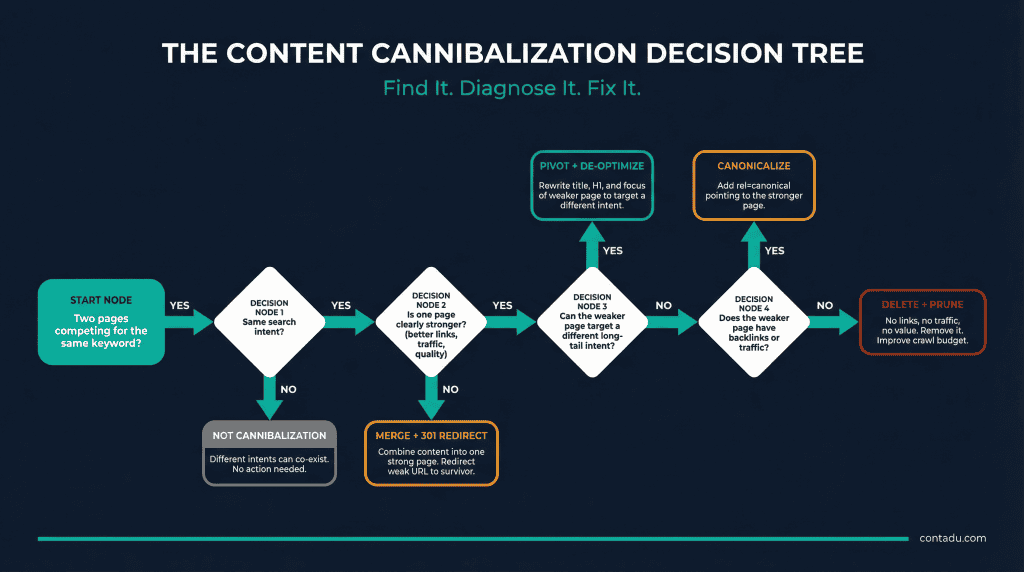
The Cannibalization Decision Tree: How to Fix It
Once you’ve identified two or more pages competing for the same intent, you need to decide how to resolve the conflict. Do not just blindly delete pages. Use this decision tree to determine the best course of action.
Action 1: Consolidate and Redirect (The “Merge”)
When to use it: You have multiple thin or mediocre pages covering the same topic, and neither is ranking particularly well.
The Fix:
1.Choose the strongest page (the one with the best backlinks or highest historical traffic) to be the “Survivor.”
2.Take any unique, valuable content from the weaker pages and add it to the Survivor to make it a comprehensive, topical authority piece.
3.Delete the weaker pages and set up 301 redirects pointing their old URLs to the Survivor URL. This consolidates all link equity into one powerhouse page.
Action 2: De-optimize and Shift Intent (The “Pivot”)
When to use it: You have two great pages that you want to keep, but they are accidentally competing for the same broad term. One should be top-of-funnel, the other bottom-of-funnel.
The Fix:
Keep both pages, but aggressively change the focus of one. Change its title tag, H1, internal links, and meta description to target a more specific, long-tail variation of the keyword. For example, shift “Content Marketing Tools” to “Free Content Marketing Tools for Startups.”
Action 3: Delete (The “Prune”)
When to use it: The cannibalizing page is old, outdated, has no backlinks, generates zero traffic, and offers no unique value that can be merged into another page.
The Fix:
Simply delete the page (return a 404 or 410 status code). If it has no value and no links, a redirect is unnecessary. Pruning dead weight improves your site’s overall crawl budget and quality score.
Action 4: Canonicalize (The “E-commerce Fix”)
When to use it: You have nearly identical pages that must exist for user experience, such as product pages with slight variations (e.g., a red shirt and a blue shirt) or syndicated content.
The Fix:
Add a rel=”canonical” tag to the duplicate pages, pointing to the primary version you want Google to rank. This tells Google, “I know these look the same; please only rank this specific one.”
Putting It Into Practice: Diagnosing Cannibalization with Contadu
Finding cannibalization manually is tedious. A content intelligence platform like Contadu streamlines this process, moving you from detection to resolution in a fraction of the time.
- Instant Keyword Overlap Detection:
When you plan a new article in Contadu, the platform doesn’t just suggest keywords; it analyzes your existing domain to see if you already rank for them. This built-in “Cannibalization Check” prevents you from creating competing content before you even write the first draft.
- Content Auditing and Topic Clustering:
Contadu’s Content Audit feature is designed to identify overlapping themes across your entire site. By grouping your existing pages into semantic clusters, it visually highlights where you have three weak pages covering the same intent instead of one strong pillar page. This data is the foundation of a strategic content refresh playbook.
- Optimizing the “Survivor” Page:
When you decide to merge multiple cannibalizing pages, you need to ensure the resulting “Survivor” page is fully optimized to rank for the combined semantic cluster. You can paste the merged content into Contadu’s Content Editor to instantly see which crucial entities and related terms you missed during the consolidation process, guaranteeing the new page is significantly stronger than the sum of its parts.
Conclusion: Stop Fighting Yourself
Content cannibalization is the inevitable result of scaling a blog without a centralized strategy. It’s the SEO equivalent of friendly fire.
The good news is that fixing cannibalization is often the fastest way to see significant ranking improvements. By consolidating weak pages, clarifying search intent, and strategically pruning dead weight, you aren’t just cleaning up your site architecture; you are concentrating your site’s authority into a focused, powerful laser beam.
Stop writing new content that competes with your old content. Audit your site, build a clear topical map, and ensure every page has a unique, profitable reason to exist.
FAQ
Is it always bad to have two pages ranking for the same keyword?
No, not always. If you have two pages ranking on Page 1 (e.g., Positions 2 and 3) for a high-value keyword, that is “SERP domination,” not cannibalization. You are taking up more real estate and pushing competitors down. Cannibalization is only a problem when the pages are suppressing each other’s rankings (e.g., both stuck on Page 3) or when the wrong page is ranking higher.
How long does it take to see results after fixing cannibalization?
If you use the “Merge and Redirect” strategy (301 redirects), you can often see ranking improvements within a few weeks as Google recrawls the URLs and consolidates the link equity. If you simply delete a page or change a title tag, the results can be slower, depending on your site’s crawl rate.
What if two pages have the same keyword but totally different search intents?
This is not cannibalization. For example, if you sell CRM software, you might have a product page targeting “CRM software” (transactional intent) and a blog post titled “What is CRM Software?” (informational intent). Google understands these serve different user needs and will rank them accordingly based on the user’s specific query.
Should I use 301 redirects or canonical tags to fix cannibalization?
Use a 301 redirect when you want to permanently merge two pages into one and pass all the link equity to the survivor page. The old page will cease to exist for users. Use a canonical tag when you need both pages to remain live and accessible to users (e.g., a printable version of an article or a product variant), but you only want Google to index and rank one specific version.
How do I prevent content cannibalization from happening in the future?
The best prevention is a centralized content calendar and a strict content operations workflow. Before writing any new piece of content, your team must search your existing database (or use a tool like Contadu) to ensure you don’t already have an asset targeting that specific intent. Every new article must have a unique primary keyword and a clearly defined, non-overlapping purpose.
